
Information and Communication Technology
- Information and Communication Technology (ICT) refers to the collection of technologies used to create, process, store, retrieve, transmit and exchange information in digital or electronic form.
- ICT combines information-processing technologies with communication systems, enabling people, organisations and machines to exchange information efficiently.
- It encompasses:
- Computers and computing devices.
- Telecommunication networks.
- Internet and web technologies.
- Computer software and applications.
- Data storage and management systems.
- Digital communication equipment.
- Cloud computing and data centres.
- Artificial intelligence and emerging digital technologies.
- ICT has transformed education, governance, healthcare, banking, commerce, agriculture, industry and scientific research.
- It provides the technological foundation for the modern Digital Economy, where data, connectivity and digital services are major drivers of economic activity.
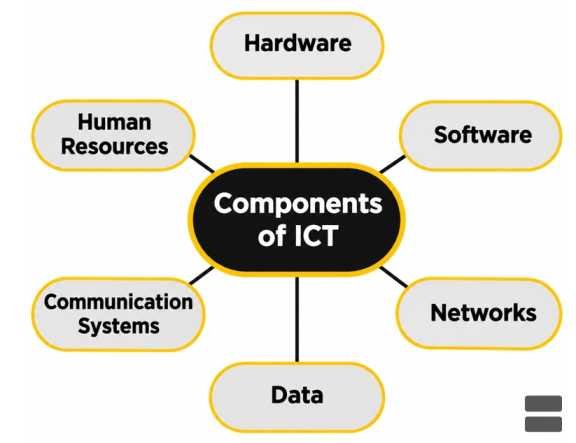
Components of ICT
| Component | Meaning | Examples |
|---|---|---|
| Hardware | Physical electronic equipment | Computers, smartphones, servers, routers |
| Software | Programs and instructions controlling hardware | Operating systems, applications |
| Networks | Systems connecting devices for communication | LAN, WAN, mobile networks |
| Data | Information represented in a processable form | Documents, images, databases |
| Communication Systems | Technologies transmitting information | Optical fibre, satellites, wireless networks |
| Human Resources | People who operate, develop and maintain ICT systems | Programmers, engineers, administrators |
ICT and Information Technology (IT)
- Information Technology (IT) primarily concerns the use of computers, software and related systems for processing, storing and managing information.
- ICT is a broader concept because it also explicitly encompasses communication and connectivity technologies.
- IT constitutes an important component of ICT.
| Basis | Information Technology (IT) | Information and Communication Technology (ICT) |
|---|---|---|
| Scope | Comparatively narrower | Broader |
| Primary concern | Information processing and management | Information processing and communication |
| Major components | Computers, databases, applications | IT systems, telecommunication networks, broadcasting |
| Examples | Database software, computer systems | Video conferencing, internet, satellite communication |
| Principal emphasis | Information handling | Information handling and exchange |
Importance of ICT
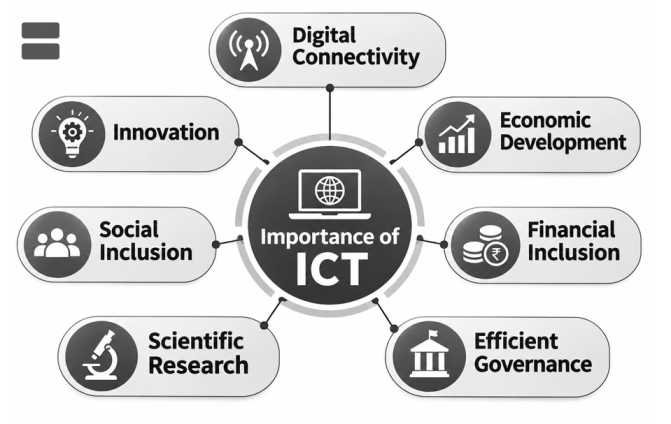
- Digital Connectivity: Connects individuals, institutions and businesses across geographical boundaries.
- Economic Development: Supports digital markets, productivity and technology-enabled services.
- Financial Inclusion: Facilitates digital payments, online banking and financial access.
- Efficient Governance: Improves public-service delivery, transparency and administrative coordination.
- Scientific Research: Enables data analysis, modelling, collaboration and high-performance computing.
- Social Inclusion: Expands opportunities for education, healthcare and communication in underserved areas.
- Innovation: Supports the development of artificial intelligence, automation, robotics and other emerging technologies.
Applications of ICT
Major Applications
1. E-Commerce
- Electronic Commerce refers to buying and selling goods and services through electronic networks, particularly the internet.
- It includes:
- Online retail.
- Digital marketplaces.
- Electronic payments.
- Online booking and ticketing.
- Business-to-business transactions.
- E-commerce expands market access and allows businesses to serve customers across geographical boundaries.
2. E-Governance
- Electronic Governance involves using digital technologies to improve government administration and public-service delivery.
- Major applications include:
- Online certificates and applications.
- Digital identification.
- Electronic records.
- Direct benefit transfers.
- Online grievance redressal.
- Digital public procurement.
- Important Indian examples include DigiLocker, UMANG, Aadhaar-enabled services, e-District platforms and digital land-record systems.
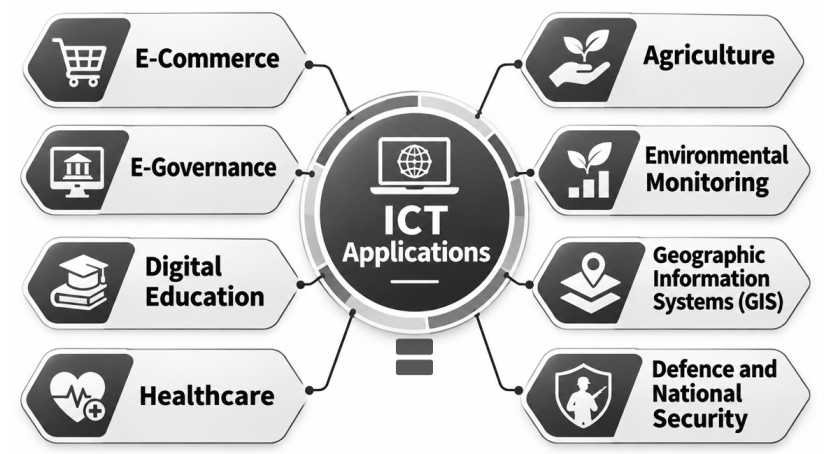
3. Digital Education
- ICT enables education through:
- Virtual classrooms.
- Learning Management Systems (LMS).
- Recorded lectures.
- Online examinations.
- Digital libraries.
- Interactive educational content.
- Important Indian initiatives include DIKSHA, SWAYAM, PM eVIDYA and the National Digital Library of India (NDLI).
- Digital platforms can improve accessibility, but their effectiveness depends on internet connectivity, device availability and digital literacy.
- ICT enables education through:
4. Healthcare
- ICT supports:
- Telemedicine.
- Electronic Health Records (EHRs).
- Digital diagnostic systems.
- Hospital information systems.
- Remote patient monitoring.
- The Ayushman Bharat Digital Mission (ABDM) seeks to strengthen India’s digital health ecosystem.
- Digital healthcare technologies can improve access to specialist services, particularly in remote areas.
- ICT supports:
5. Agriculture
- ICT enables:
- Weather advisories.
- Market-price information.
- Precision agriculture.
- Crop monitoring.
- Digital extension services.
- Agricultural supply-chain coordination.
- Satellite imagery, sensors and mobile applications support more informed agricultural decisions.
- ICT enables:
6. Environmental Monitoring
- ICT integrates satellite observations, geographical information and sensor measurements.
- Important applications include:
- Pollution monitoring.
- Forest-fire detection.
- Flood forecasting.
- Drought assessment.
- Climate modelling.
- Wildlife and biodiversity monitoring.
7. Geographic Information Systems (GIS)
- A Geographic Information System is a computer-based framework for capturing, storing, analysing and displaying geographically referenced information.
- GIS combines spatial data with descriptive information.
- Important applications include:
- Urban planning.
- Land-resource mapping.
- Disaster management.
- Infrastructure development.
- Transport planning.
- Environmental impact assessment.
8. Defence and National Security
- ICT supports secure communication, surveillance, intelligence analysis and command systems.
- Applications include:
- Satellite-based communication.
- Radar and sensor networks.
- Cyber defence.
- Unmanned systems.
- Geospatial intelligence.
- The security of critical digital infrastructure is an important national-security concern.
ICT in Digital Lending and Financial Services
- Digital Lending refers to lending activities in which important stages of the loan process are conducted using digital technologies.
- Such stages may include:
- Customer identification.
- Credit assessment.
- Loan application.
- Approval.
- Disbursement.
- Repayment.
- Digital lending commonly uses electronic records, digital identity verification and automated credit-assessment tools.
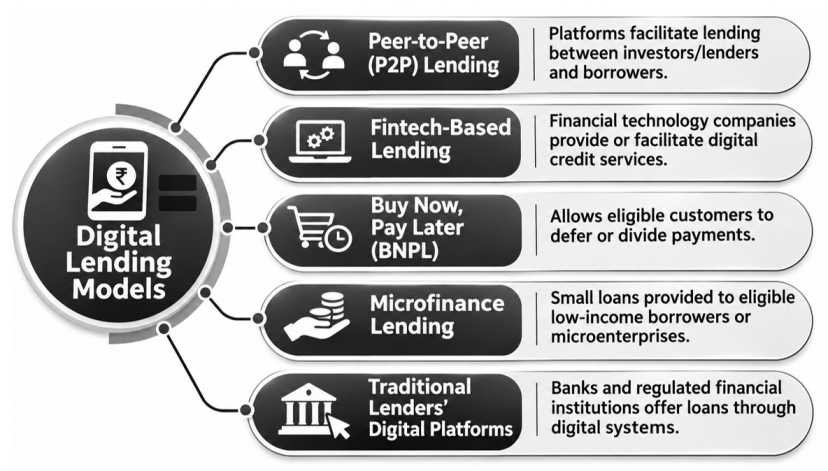
Major Models
| Model | Characteristics |
|---|---|
| Peer-to-Peer (P2P) Lending | Platforms facilitate lending between investors/lenders and borrowers |
| Fintech-Based Lending | Financial technology companies provide or facilitate digital credit services |
| Buy Now, Pay Later (BNPL) | Allows eligible customers to defer or divide payments |
| Microfinance Lending | Small loans provided to eligible low-income borrowers or microenterprises |
| Traditional Lenders’ Digital Platforms | Banks and regulated financial institutions offer loans through digital systems |
- Digital lending can reduce processing time and expand access to credit.
- However, it also creates concerns regarding:
- Data privacy.
- Predatory lending.
- Algorithmic discrimination.
- Excessive interest or hidden charges.
- Unauthorised access to financial information.
- Digital lending activities in India are subject to applicable Reserve Bank of India (RBI) regulations and consumer-protection requirements.
Emerging ICT Applications
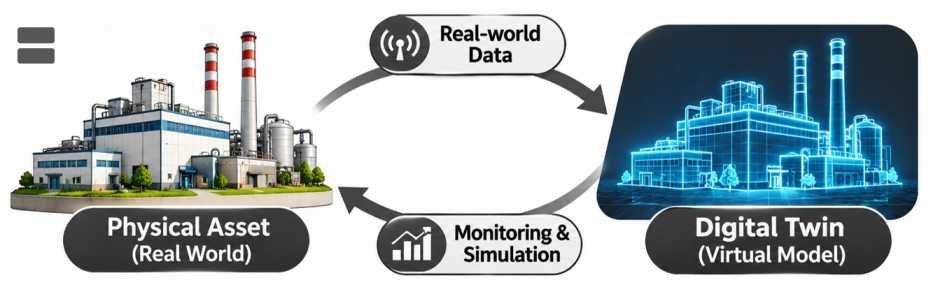
- Digital Twins: Virtual representations of physical assets or systems that can incorporate real-world data for monitoring and simulation.
- Smart Cities: Integration of connected sensors, networks and data analytics into urban services.
- Industrial Automation: Use of digital systems to monitor and control manufacturing processes.
- Predictive Maintenance: Application of sensor data and analytical models to identify potential equipment failures.
- Smart Grids: Digital monitoring and control of electricity networks.
- Smart Mobility: Connected transportation, traffic management and intelligent navigation.
- Digital Public Infrastructure: Shared digital systems enabling public and private services at scale.
Computers
- A Computer is a programmable electronic device that receives data, processes it according to instructions, stores information and produces outputs.
- A computer operates through the interaction of hardware and software.
- Its principal functions may be represented as : Input → Processing → Output → Storage
- Computers perform arithmetic, logical, communication and data-management operations.
- Modern computing devices range from embedded controllers to high-performance supercomputers.

Characteristics of Computers
- Speed: Performs large numbers of operations within short intervals.
- Accuracy: Produces correct results when supplied with appropriate instructions and data and when functioning correctly.
- Automation: Executes programmed sequences with limited human intervention.
- Storage Capacity: Stores large quantities of digital information.
- Versatility: Supports many types of applications.
- Connectivity: Exchanges information with other devices.
- Programmability: Can be instructed to perform new tasks through software.
Bits, Bytes and Digital Information
- The Bit (Binary Digit) is the basic unit of digital information.
- A bit represents one of two values, conventionally written as 0 or 1.
- A Byte usually consists of 8 bits.
- Eight bits can represent:
28 = 256
possible bit patterns.
- Digital information is represented using binary sequences.
- Computers encode text, images, audio and video as digital data.
| Unit | Relationship |
|---|---|
| Bit (b) | Basic binary digit |
| Byte (B) | 8 bits |
| Kilobyte (kB) | 1,000 bytes |
| Megabyte (MB) | 1,000 kB |
| Gigabyte (GB) | 1,000 MB |
| Terabyte (TB) | 1,000 GB |
| Kibibyte (KiB) | 1,024 bytes |
| Mebibyte (MiB) | 1,024 KiB |
| Gibibyte (GiB) | 1,024 MiB |
- Decimal prefixes such as kB and MB differ from binary prefixes such as KiB and MiB.
- This distinction is particularly important in computer storage and memory specifications.
Classification of Computers
1. Personal Computers (PCs)
- Designed primarily for individual use.
- Examples include desktops and laptops.

2. Workstations
- High-performance personal computers intended for specialised professional tasks.
- Applications include engineering design, graphics, scientific analysis and software development.
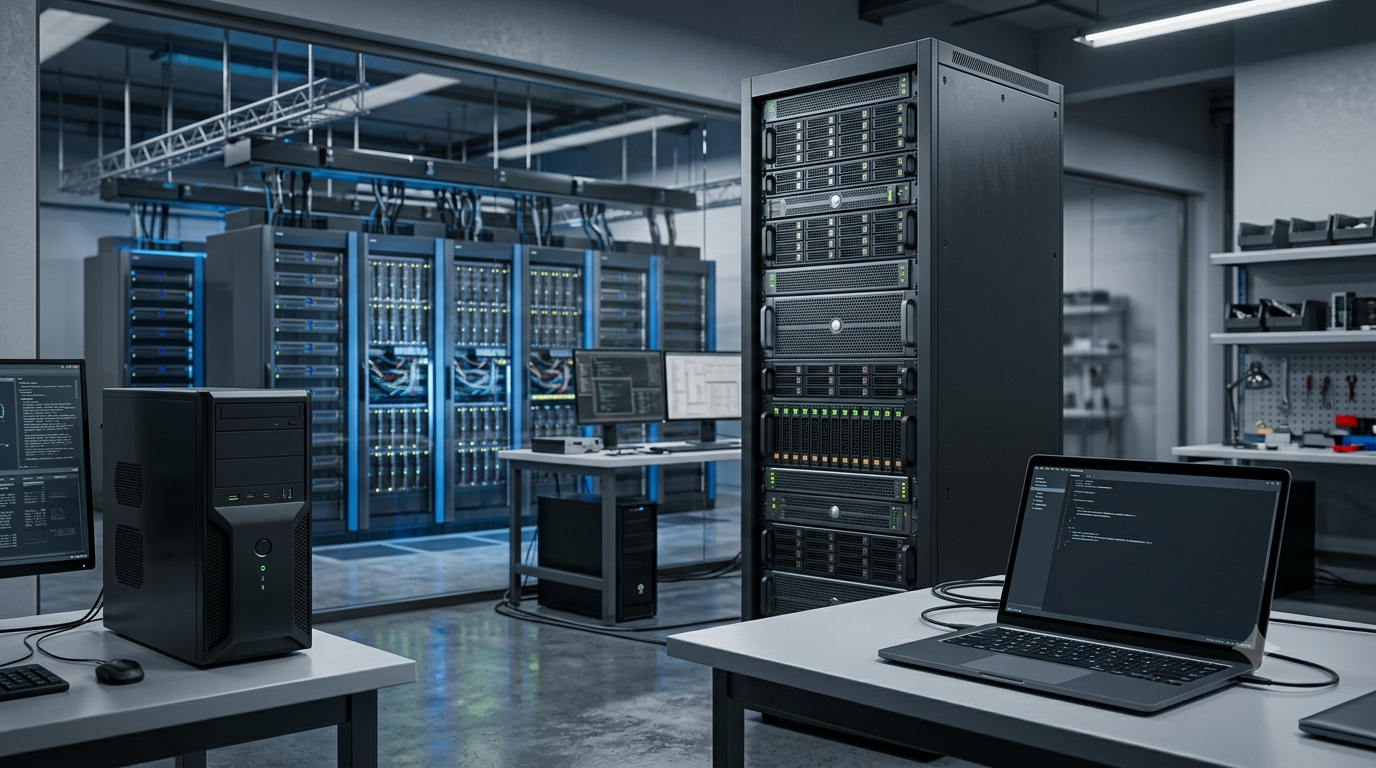
3. Servers
- Provide computing resources, applications or services to other computers over a network.
- Examples include web servers, database servers and file servers.
4. Mainframe Computers
- Designed to manage large-scale transaction processing and enterprise workloads.
- Used in banking, government administration and major organisations.
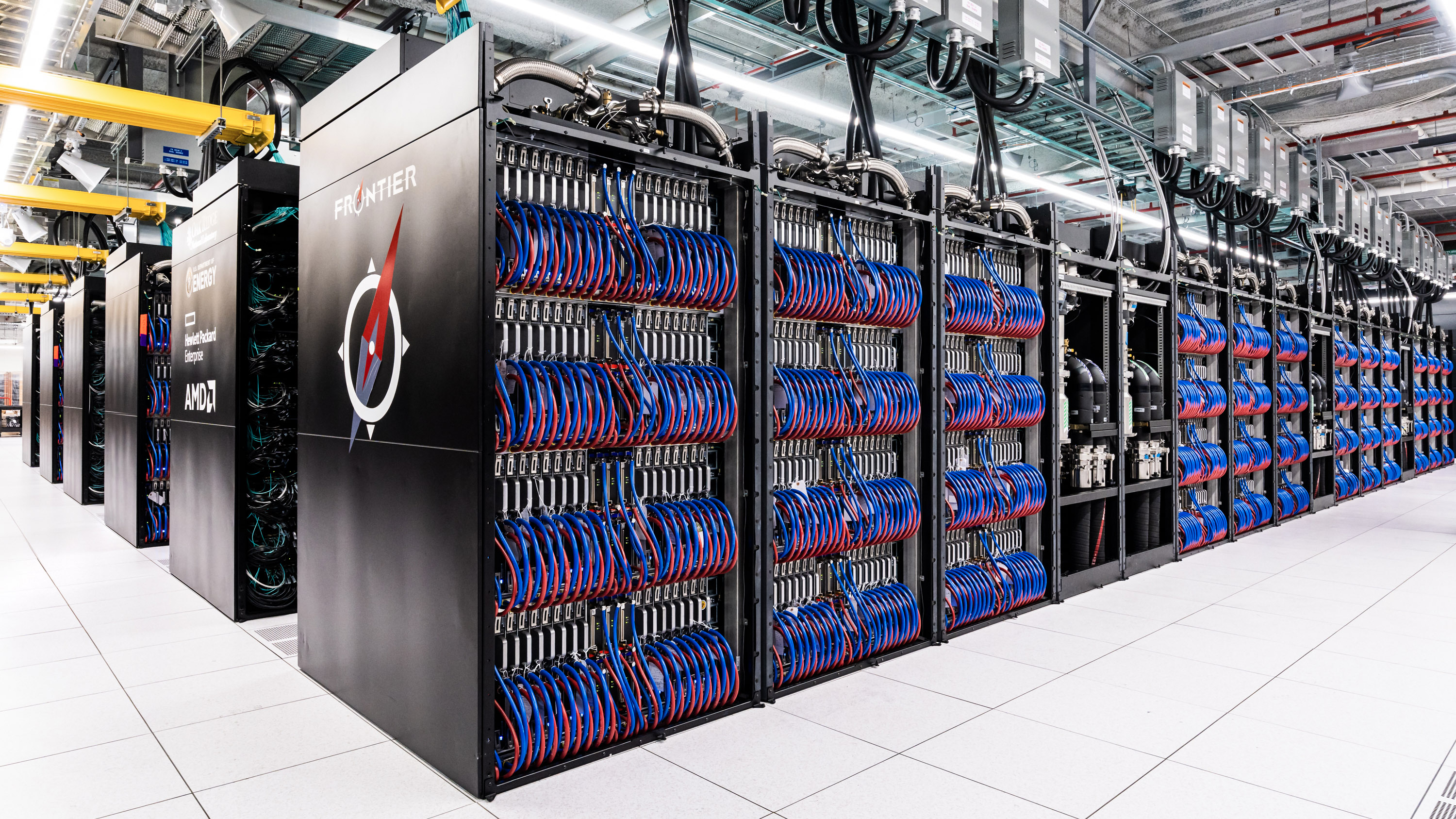
5. Supercomputers
- Highly parallel computing systems designed for demanding scientific and engineering workloads.
- Used for simulations, modelling and advanced data analysis.
6. Embedded Computers
- Integrated into other devices or machines.
- Examples include automotive controllers, medical equipment and industrial sensors.
7. Mobile and Wearable Computers
- Include smartphones, tablets, smartwatches and other portable connected devices.
8. Quantum Computers
- Experimental and developing computing systems that use quantum-mechanical information processing.
- Their principles differ substantially from those of conventional classical computers.
Computer Memory and Storage
| Feature | Primary Memory | Secondary Storage |
|---|---|---|
| Purpose | Holds data and instructions used directly by processing systems | Long-term information storage |
| Examples | RAM, cache memory | SSD, HDD, optical discs |
| Speed | Generally faster | Generally slower than primary memory |
| Volatility | RAM is generally volatile | Usually non-volatile |
| Typical capacity | Comparatively limited | Usually larger |
| Principal role | Active computation | Persistent data retention |
Computer Hardware and Software
Components of Computer Hardware
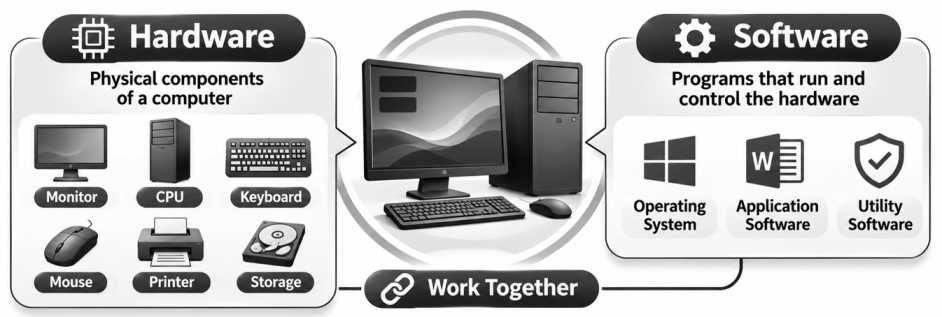
- Hardware consists of the physical components of a computer system.
- Major components include:
1. Central Processing Unit (CPU)
- Executes machine instructions and performs computational operations.
- Common functional components include:
- Arithmetic Logic Unit (ALU).
- Control Unit.
- Registers.
- Associated cache and processing circuitry.
2. Random Access Memory (RAM)
- Holds instructions and data needed during active computation.
- Usually volatile, meaning stored information is lost when power is removed.
3. Read-Only Memory (ROM)
- Refers to non-volatile memory technologies historically associated with storing relatively permanent instructions.
- Modern systems commonly use rewritable non-volatile flash memory for firmware.
4. Storage Devices
- Hard Disk Drives (HDDs) use magnetic storage.
- Solid-State Drives (SSDs) use semiconductor-based non-volatile memory.
- Optical discs and removable storage provide other methods of data retention.
5. Motherboard
- Main circuit board connecting the processor, memory, storage interfaces and other components.
6. Power Supply Unit (PSU)
- Converts and distributes electrical power required by computer components.
7. Input Devices
- Keyboard.
- Mouse.
- Scanner.
- Microphone.
- Camera.
- Touchscreen.
8. Output Devices
- Monitor.
- Printer.
- Speaker.
- Projector.
- Haptic output devices.
Meaning of Software
- Software refers to programs, instructions and associated data that direct computer operations.
- Software is broadly classified into:
System Software
- Operating systems.
- Device drivers.
- Utility software.
- System-management tools.
Application Software
- Word processors.
- Web browsers.
- Spreadsheet software.
- Educational applications.
- Graphic-design tools.
- Database applications.
Programming and Development Software
- Compilers.
- Interpreters.
- Code editors.
- Debuggers.
- Integrated Development Environments (IDEs).
Operating System (OS)
- An Operating System manages computer hardware resources and provides services to applications.
- Its major functions include:
- Process scheduling.
- Memory management.
- File management.
- Device management.
- User authentication.
- Security controls.
- Networking.
- Examples include Windows, Linux, macOS, Android and iOS.
- An operating system acts as an important interface between software applications and hardware.
BIOS and UEFI
- BIOS (Basic Input/Output System) is traditional firmware used for initialising hardware and starting the computer boot process.
- UEFI (Unified Extensible Firmware Interface) is a modern firmware interface that supports advanced boot and system-management functions.
| Feature | Legacy BIOS | UEFI |
|---|---|---|
| Architecture | Older firmware framework | Modern firmware specification |
| Boot support | Traditional boot methods | Advanced boot management |
| Partition compatibility | Commonly associated with MBR | Supports GPT and other configurations |
| Security | Limited modern boot-security features | Can support Secure Boot |
| Firmware interface | Relatively restricted | More extensible |
| Present relevance | Legacy systems | Modern computers |
- Secure Boot is a UEFI-associated security mechanism intended to help prevent unauthorised software from running during the boot process.
- UEFI does not automatically guarantee security; the benefits depend on configuration and implementation.
Open-Source and Proprietary Software
| Feature | Open-Source Software | Proprietary Software |
|---|---|---|
| Source code | Available under specified licence terms | Usually not openly available |
| Modification | Permitted according to the licence | Generally restricted |
| Distribution | Governed by open-source licence | Governed by proprietary licence |
| Examples | Linux kernel, LibreOffice, Firefox | Microsoft Windows, many commercial applications |
| Cost | May be free or commercially supported | May be free or paid |
- Open Source does not necessarily mean that software has no commercial cost.
- Open-source licences govern rights to use, modify and redistribute software.
- India has encouraged open-source technologies for selected digital public infrastructure and e-governance applications.
Indian Operating System Initiatives
- Bharat Operating System Solutions (BOSS) is an Indian GNU/Linux distribution associated with C-DAC.
- It has been developed to support Indian-language computing and selected government and educational requirements.
- BharOS is an Android Open Source Project-based mobile operating system developed by JandK Operations Private Limited, associated with the IIT Madras ecosystem.
- BharOS is intended for selected organisations requiring specialised mobile-security and management capabilities.
- These systems represent efforts to strengthen indigenous software capabilities and technological self-reliance.
Supercomputers and High-Performance Computing
- A Supercomputer is a high-performance computing system designed to perform exceptionally demanding computational tasks.
- Supercomputers use large numbers of processing units working together through Parallel Computing.
- They are particularly important for tasks requiring:
- Large-scale numerical simulation.
- Extensive data processing.
- Complex mathematical modelling.
- High-performance scientific computation.
- Their performance is often measured in Floating-Point Operations Per Second (FLOPS).
Computing Performance Units
| Unit | Floating-Point Operations per Second |
|---|---|
| GFLOPS | 109 |
| TFLOPS | 1012 |
| PFLOPS | 1015 |
| EFLOPS | 1018 |
- Exascale Computing refers to computing performance at or above approximately 1018 floating-point operations per second on relevant benchmarks.
- Supercomputer performance depends not only on processor speed but also on:
- Memory capacity and bandwidth.
- Interconnection networks.
- Parallel software.
- Storage systems.
- Energy efficiency.
- Cooling.
Major Applications
- Weather Forecasting: Numerical weather prediction and monsoon modelling.
- Climate Research: Long-term climate simulations and assessment of climate variability.
- Disaster Management: Cyclone tracking, flood modelling and hazard assessment.
- Drug Discovery: Molecular simulation and computational screening.
- Genomics: Analysis of genetic and biological datasets.
- Astrophysics: Simulation of cosmic phenomena.
- Engineering: Aerodynamics, fluid dynamics and structural analysis.
- Artificial Intelligence: Training and operation of computationally demanding AI systems.
- Materials Science: Simulation of atomic and molecular structures.
- Financial Modelling: Risk assessment and complex numerical analysis.
Development of Supercomputing in India
- India’s indigenous supercomputing efforts expanded during the late twentieth century.
- Centre for Development of Advanced Computing (C-DAC) played a foundational role.
- PARAM 8000, developed by C-DAC and unveiled in 1991, was a major milestone in indigenous supercomputing.
- Subsequent systems improved computing performance and domestic engineering capabilities.
| Supercomputer | Institution / Development | Significance |
|---|---|---|
| PARAM 8000 | C-DAC | Early indigenous parallel supercomputer |
| PARAM Yuva | C-DAC | Advancement of high-performance computing |
| PARAM Siddhi-AI | C-DAC | AI-oriented high-performance computing |
| PARAM Pravega | IISc Bengaluru | Academic and scientific supercomputing |
| PARAM Rudra | National Supercomputing Mission | Indigenous high-performance computing platform |
| Pratyush | IITM, Pune | Weather and climate research |
| Mihir | NCMRWF, Noida | Weather and atmospheric modelling |
| AIRAWAT | C-DAC | AI-oriented research computing infrastructure |
National Supercomputing Mission (NSM)
- The National Supercomputing Mission was launched in 2015.
- It is implemented through the Department of Science and Technology (DST) and Ministry of Electronics and Information Technology (MeitY).
- C-DAC and the Indian Institute of Science (IISc) are major implementing institutions.
- Its objectives include:
- Developing indigenous supercomputing infrastructure.
- Expanding access to high-performance computing.
- Supporting scientific research.
- Developing domestic hardware and software technologies.
- Training skilled professionals.
- Strengthening national technological self-reliance.
Recent Progress under NSM
Supercomputers deployed: 40 (As of September 2026)
Combined computing capacity: 68 PF (Petaflops)
- As of September 2026, India had deployed 40 supercomputers under NSM.
- Their cumulative computing capacity was approximately 68 petaflops.
- The deployed infrastructure included:
- 13 high-end systems exceeding 1 PF.
- 12 mid-range systems between 500 TF and 1 PF.
- 15 systems below 500 TF.
- The mission has contributed to indigenous servers, software, cooling and networking technologies.
- Its applications include weather prediction, climate modelling, computational biology, astrophysics and disaster management.
PARAM Rudra
- PARAM Rudra is an indigenous high-performance computing platform associated with NSM.
- In September 2024, three PARAM Rudra systems were inaugurated at:
- Inter-University Accelerator Centre (IUAC), New Delhi.
- National Centre for Radio Astrophysics (NCRA), Pune.
- S. N. Bose National Centre for Basic Sciences, Kolkata.
- These facilities support specialised scientific computation.
- The programme contributes to domestic capabilities in high-performance computing infrastructure and associated technologies.
Computer Display Technologies
Meaning of Display Technology
- Display Technology refers to electronic systems that present information visually.
- Displays convert electrical signals into visible images, text, graphics or video.
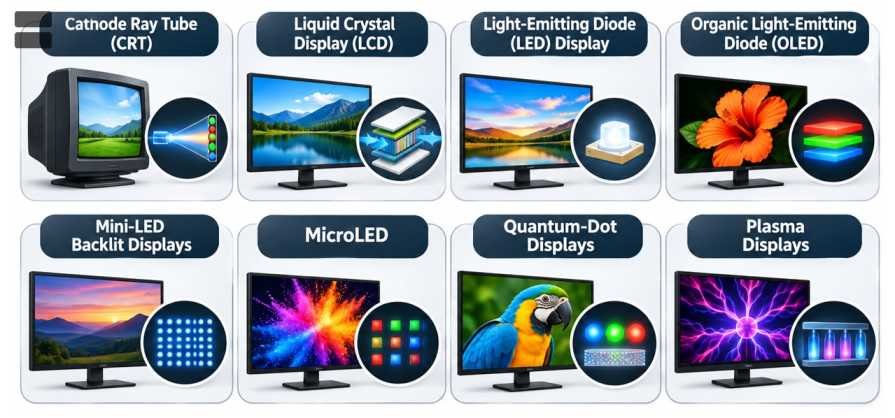
- Common display technologies include:
- Cathode Ray Tube (CRT).
- Liquid Crystal Display (LCD).
- Light-Emitting Diode (LED) Display.
- Organic Light-Emitting Diode (OLED).
- Mini-LED Backlit Displays.
- MicroLED.
- Quantum-Dot Displays.
- Plasma Displays.
Liquid Crystal Display (LCD)
- LCD uses liquid crystals to control the passage of light.
- Liquid crystals modify their optical behaviour when subjected to electric fields.
- Most LCDs require a backlight because their pixels do not independently generate visible light.
- Major advantages include:
- Relatively low power consumption compared with older CRT technology.
- Thin design.
- Wide application range.
- Established manufacturing infrastructure.
- Limitations may include restricted contrast and viewing angles, depending on panel design.
Major LCD Panel Types
| Technology | Major Characteristics |
|---|---|
| TN (Twisted Nematic) | Often offers fast response times; viewing angles and colour performance may be limited |
| IPS (In-Plane Switching) | Generally offers wide viewing angles and good colour consistency |
| VA (Vertical Alignment) | Often offers relatively strong contrast and deep blacks |
| TFT-LCD | Uses thin-film transistors to control individual pixels |
- TFT is an active-matrix addressing technology and is not a separate category of light-emitting display.
LED Displays
- LED stands for Light-Emitting Diode.
- An LED is a semiconductor device that emits light when electrical current passes through it under suitable conditions.
- The expression LED TV often refers to an LCD television using LEDs as its backlight.
- Such an LED-backlit LCD should not be confused with a self-emissive direct-view LED display.
- Advantages of LED backlighting include:
- Improved energy efficiency.
- Reduced thickness.
- Better backlight control in advanced designs.
- Longer useful operating life in suitable applications.
Organic Light-Emitting Diode (OLED)
- OLED uses organic electroluminescent materials that emit light when electrically stimulated.
- Each OLED pixel can generate its own light.
- A separate backlight is therefore unnecessary.
- Important advantages include:
- High contrast.
- Deep black levels.
- Wide viewing angles.
- Thin panel construction.
- Potential for flexible or foldable displays.
- Limitations include:
- Possible image retention and burn-in.
- Material ageing.
- Brightness limitations in certain conditions.
- Manufacturing costs.
MicroLED
- MicroLED is a self-emissive display technology using microscopic inorganic LEDs as pixels or subpixels.
- Like OLED, MicroLED does not require a conventional LCD backlight.
- Unlike OLED, its emitting materials are inorganic semiconductors.
- Potential advantages include:
- High brightness.
- High contrast.
- Fast response.
- Long operating life.
- Potential energy efficiency.
- Challenges include mass transfer, manufacturing yield, cost and precision assembly.
Mini-LED
- Mini-LED generally refers to small LED devices used for advanced display backlighting.
- Mini-LED backlights can provide many local-dimming zones.
- This may improve contrast and brightness control in LCD panels.
- Mini-LED displays remain fundamentally different from self-emissive OLED or MicroLED systems.
Quantum-Dot Displays
- Quantum Dots are nanoscale semiconductor structures whose optical properties depend partly on their dimensions.
- They can emit light of different colours when excited.
- Quantum dots are used in different display architectures, including:
- Quantum-dot-enhanced LCDs.
- Quantum-dot OLED systems.
- Experimental electroluminescent quantum-dot displays.
- Quantum-dot enhancement can improve colour gamut and colour purity.
- QLED in many commercially marketed televisions refers to a quantum-dot-enhanced LCD, not necessarily a self-emissive quantum-dot display.
Plasma Display
- Plasma Displays use small gas-filled cells that produce ultraviolet radiation when electrically excited.
- The ultraviolet radiation stimulates phosphors to emit visible light.
- Plasma displays were historically used in large flat-panel televisions.
- They provided good viewing angles and motion reproduction but were generally relatively power-intensive.
- They have largely been replaced by LCD and OLED technologies.
Cathode Ray Tube (CRT)
- CRT stands for Cathode Ray Tube.
- It uses electron beams directed towards a phosphor-coated screen to produce images.
- CRTs were widely used in older televisions and computer monitors.
- Major limitations include:
- Large physical size.
- Greater weight.
- Relatively high power consumption.
- Bulkier construction compared with modern flat-panel displays.
Comparison of Display Technologies
| Feature | LCD | LED-Backlit LCD | OLED | MicroLED |
|---|---|---|---|---|
| Image formation | Liquid crystals control transmitted light | LCD with LED backlight | Organic pixels emit light | Inorganic microscopic LEDs emit light |
| Backlight | Required | Required | Not required | Not required |
| Black levels | Dependent on backlighting | Improved in advanced local-dimming designs | Excellent | Excellent |
| Brightness | Varies by design | Can be high | Varies by design | Potentially very high |
| Flexibility | Limited in conventional panels | Limited in conventional panels | Flexible designs possible | Advanced flexible configurations possible |
| Burn-in concern | Generally low | Generally low | Possible | Generally lower susceptibility than OLED |
| Manufacturing maturity | Established | Established | Commercially established | Emerging |
Communication Systems and Transmission Media
Meaning of Communication
- Communication Technology involves the transmission and reception of information between devices or locations.
- A communication system typically contains:
- Information Source.
- Transmitter.
- Communication Channel.
- Receiver.
- Destination.
- Information may be transmitted using electrical signals, light or electromagnetic waves.
- Communication channels are broadly classified into:
- Guided or Wired Media.
- Unguided or Wireless Media.
Wired Communication
1. Twisted-Pair Copper Cable
- Contains insulated copper conductors twisted around one another.
- Widely used in telephone and Ethernet networks.
- Twisting reduces certain forms of electromagnetic interference and crosstalk.
- Performance depends on cable category, construction and installation.
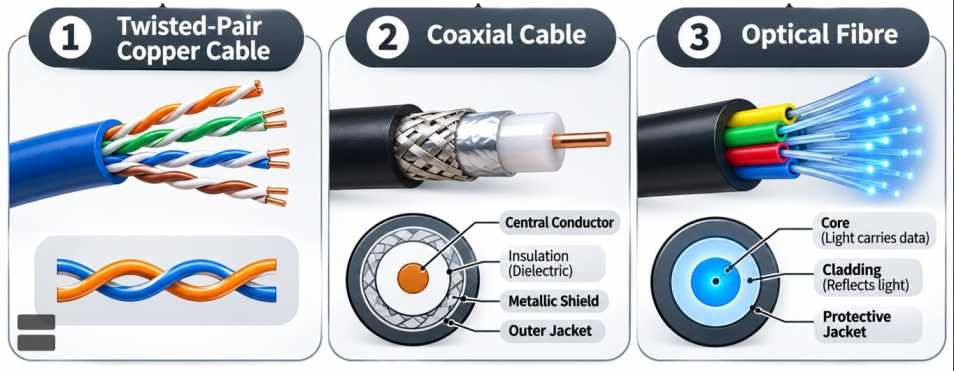
2. Coaxial Cable
- Contains an inner conductor surrounded by insulating material and a conductive shield.
- Used in cable television, radio-frequency systems and broadband networks.
- The shielding helps reduce electromagnetic interference.
3. Optical Fibre
- Transmits information using light guided through optical fibres.
- Modern optical fibres are commonly manufactured from high-purity glass.
- Their operation relies on controlled optical propagation within a fibre structure.
- Fibre-optic communication supports extremely high data-transmission capacity.
Types of Optical Fibre
| Feature | Single-Mode Fibre | Multimode Fibre |
|---|---|---|
| Core diameter | Smaller | Larger |
| Propagation | Primarily one spatial mode | Multiple spatial modes |
| Typical distance | Long-distance transmission | Shorter-distance links |
| Bandwidth-distance capability | Generally higher | Comparatively lower |
| Applications | Telecom backbone, long-haul networks | Data centres and building networks |
Advantages of Optical Fibre
- High Bandwidth: Supports large data-transmission capacity.
- Low Attenuation: Suitable for long-distance communication.
- Electromagnetic Immunity: Not affected by electromagnetic interference in the same manner as metallic conductors.
- Electrical Isolation: Does not conduct electrical current along the glass fibre.
- Low Weight: Comparatively lightweight.
- Security Benefits: Physical interception may be difficult, although fibre links are not inherently immune to tapping or other attacks.
Applications of Optical Fibre
- Telecommunications backbone networks.
- Fibre-to-the-home broadband.
- Data-centre interconnections.
- Submarine communication cables.
- Medical endoscopy and optical instruments.
- Industrial sensing.
- Defence and aerospace communication.
- High-capacity digital infrastructure.
Wireless Communication
- Wireless Communication transfers information without continuous physical conductors between transmitter and receiver.
- It commonly uses electromagnetic radiation.
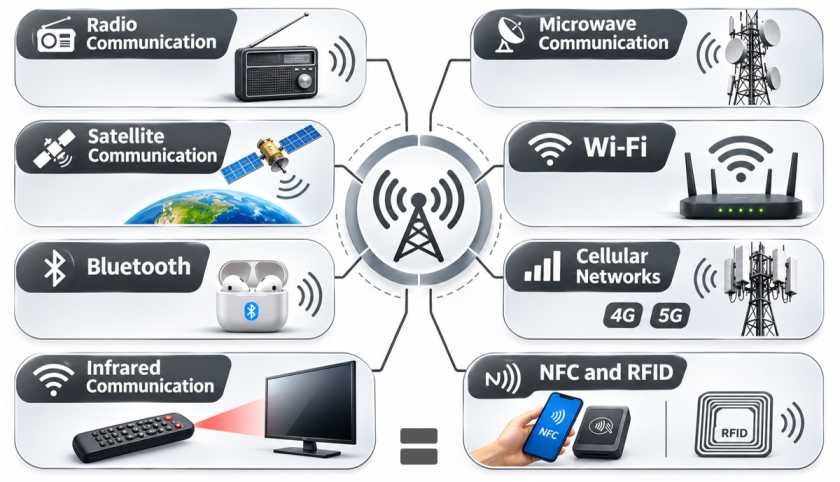
- Major technologies include:
- Radio communication.
- Microwave communication.
- Satellite communication.
- Wi-Fi.
- Bluetooth.
- Cellular networks.
- Infrared communication.
- NFC and RFID.
Electromagnetic Spectrum and Wireless Communication
| Frequency Region | Common Communication Applications |
|---|---|
| Low and Medium Frequencies | Broadcasting and specialised radio communication |
| High Frequency (HF) | Long-distance radio communication through ionospheric propagation |
| Very High Frequency (VHF) | FM radio, aviation and specialised communication |
| Ultra High Frequency (UHF) | Television, cellular systems and other wireless networks |
| Microwave Frequencies | Cellular networks, radar, Wi-Fi and satellite links |
| Millimetre Waves | High-capacity wireless systems, radar and selected 5G applications |
| Infrared | Short-range optical communication and remote controls |
- Wireless propagation depends on frequency, antenna design, terrain, atmospheric conditions and the surrounding physical environment.
- Higher frequencies can support wide channels but may experience greater obstruction and propagation losses in particular conditions.
- Wireless communication requires appropriate modulation, coding, signal processing and spectrum management.
Working of a Wireless Communication System
- Signal Generation: The source produces information in analog or digital form.
- Source Encoding: Information may be represented or compressed.
- Modulation: Information is imposed on a carrier signal or waveform.
- Transmission: The signal is radiated by an antenna.
- Propagation: The electromagnetic wave travels through the surrounding environment.
- Reception: A receiving antenna detects the signal.
- Demodulation: The receiver extracts the transmitted information.
- Decoding: The original information is reconstructed as accurately as possible.
- Output: The receiver delivers sound, images, data or other information.
Modulation Techniques
- Amplitude Modulation (AM): Changes the amplitude of a carrier wave.
- Frequency Modulation (FM): Changes the instantaneous frequency of a carrier wave.
- Phase Modulation (PM): Changes the phase of a carrier wave.
- Modern digital communication uses more advanced techniques, including:
- Phase Shift Keying (PSK).
- Quadrature Amplitude Modulation (QAM).
- Orthogonal Frequency-Division Multiplexing (OFDM).
- Modulation allows information to be transmitted efficiently through available frequency bands.
Wireless Communication, Ionosphere and Digital Television
Role of the Ionosphere in Wireless Communication
- The Ionosphere is an ionised region of Earth’s upper atmosphere containing free electrons and ions.
- It extends approximately from 60 kilometres to more than 1,000 kilometres, with its exact characteristics varying according to solar activity, altitude, geographical location and time.
- Ionisation is produced primarily through interactions between solar radiation and atmospheric gases.
- The ionosphere influences the propagation of certain radio-frequency signals.
- It is particularly important for long-distance communication in the High Frequency (HF) radio band.
How the Ionosphere Affects Radio Waves
- Radio waves travelling through ionised atmospheric regions experience changes in propagation characteristics.
- Under suitable conditions, HF radio waves are progressively refracted and can return towards Earth’s surface.
- This allows long-distance communication beyond the ordinary line-of-sight horizon.
- Such communication is known as Skywave Propagation.
- Signal propagation depends on:
- Electron density.
- Radio frequency.
- Solar radiation.
- Time of day.
- Season.
- Geomagnetic conditions.
- The ionosphere may also cause signal delays, scintillation and other disturbances affecting satellite navigation and radio communication.
Layers of the Ionosphere
| Layer | Important Characteristics |
|---|---|
| D Region | Lower ionosphere; significant absorption of certain radio frequencies |
| E Region | Can support refraction of selected HF signals |
| F Region | Important for long-distance HF propagation |
| F1 and F2 Regions | Often distinguished during daytime; their separation varies with atmospheric conditions |
- During daytime, stronger solar radiation generally increases ionisation.
- At night, ionisation patterns change as solar radiation decreases.
- The F region remains important for long-distance HF communication, while the lower ionosphere may exhibit substantial changes between day and night.
Wired versus Wireless Communication
| Feature | Wired Communication | Wireless Communication |
|---|---|---|
| Transmission medium | Copper cable or optical fibre | Electromagnetic waves through space |
| Mobility | Usually limited by physical connections | Supports mobile devices |
| Interference | Depends on medium; fibre has strong electromagnetic immunity | Affected by radio interference and propagation conditions |
| Installation | Requires physical infrastructure | Requires radio equipment and network coverage |
| Security | Depends on network design and protection | Depends on encryption, authentication and other safeguards |
| Applications | Data centres, broadband backbone, office networks | Cellular communication, Wi-Fi, satellite services |
Digital Terrestrial Television (DTT)
- Digital Terrestrial Television transmits television programmes through terrestrial radio-frequency broadcasting using digital signals.
- Digital signals carry encoded video, audio and associated information.
- Major advantages over conventional analog television transmission include:
- Efficient spectrum utilisation.
- Potential for improved picture and sound quality.
- Multiple programmes within a transmission channel.
- Electronic programme guides.
- Support for high-definition broadcasting.
- DTT uses digital modulation and error-correction techniques.
- Reception generally requires a compatible television receiver, set-top box or integrated digital tuner.
- Picture quality depends on signal strength, transmission standards, compression and receiver performance.
Mobile Communication: Evolution from 1G to 6G
Meaning of Cellular Communication
- Cellular Communication uses a network of radio base stations to provide mobile communication services.
- A geographical region is divided into coverage areas known as Cells.
- Mobile devices communicate with appropriate base stations using assigned radio-frequency resources.
- Cellular networks support user movement through procedures involving:
- Registration.
- Authentication.
- Handover.
- Mobility management.
- Radio-resource allocation.
- Successive generations of cellular technology have improved data capacity, spectral efficiency, communication reliability and network capabilities.
First Generation (1G)
- 1G represents the first generation of cellular mobile communication.
- Commercial 1G systems emerged during the 1980s.
- They used predominantly analog radio technologies.
- Services were mainly limited to voice communication.
- Major limitations included:
- Limited capacity.
- Weak security.
- Poor voice quality compared with modern networks.
- Limited data capabilities.

Second Generation (2G)
- 2G introduced digital cellular communication.
- Commercial deployment began during the early 1990s.
- It improved:
- Voice transmission.
- Spectral efficiency.
- Authentication.
- Digital data services.
- Text messaging.
- Important 2G technologies include:
- GSM (Global System for Mobile Communications).
- IS-95 CDMA.
- 2G networks helped popularise Short Message Service (SMS).
GSM
- GSM is a digital cellular communication standard originally developed for second-generation mobile networks.
- It uses a combination of frequency and time-domain resource allocation in its traditional radio interface.
- GSM became one of the world’s most widely adopted mobile communication standards.
- Its architecture helped establish international roaming and subscriber identification through SIM-based systems.
CDMA
- Code Division Multiple Access (CDMA) is a communication technique in which different users are distinguished through suitable spreading codes.
- It enables multiple users to share overlapping frequency and time resources.
- CDMA techniques were used in several mobile communication systems.
- CDMA is an access technique rather than a complete synonym for every cellular standard that employs it.
GPRS and EDGE
General Packet Radio Service (GPRS)
- GPRS introduced packet-switched data capabilities into GSM networks.
- It allowed more flexible transmission of internet-related information.
- It is sometimes informally associated with 2.5G.
Enhanced Data Rates for GSM Evolution (EDGE)
- EDGE improved data rates over traditional GPRS.
- It employed improved modulation and coding.
- It is sometimes informally described as 2.75G.
Third Generation (3G)
- 3G expanded mobile data capabilities.
- Commercial deployment began during the early 2000s.
- It enabled:
- Mobile internet access.
- Video calling.
- Multimedia services.
- Improved data communication.
- Important technologies include:
- UMTS.
- WCDMA.
- CDMA2000.
High-Speed Packet Access (HSPA)
- HSPA enhanced mobile data rates in UMTS networks.
- It includes:
- HSDPA: High-Speed Downlink Packet Access.
- HSUPA: High-Speed Uplink Packet Access.
- Later enhancements provided further improvements in data capacity and network performance.
Fourth Generation (4G)
- 4G introduced high-performance, predominantly all-IP mobile broadband systems.
- Major technologies include:
- Long Term Evolution (LTE).
- LTE-Advanced.
- 4G supports:
- High-speed internet.
- Video streaming.
- Mobile applications.
- Video conferencing.
- Online gaming.
- Internet-based communication.
- 4G networks use advanced radio-access techniques such as OFDMA in the downlink.
- Actual data speeds depend on bandwidth, network configuration, spectrum, device capabilities and radio conditions.
LTE and VoLTE
Long Term Evolution (LTE)
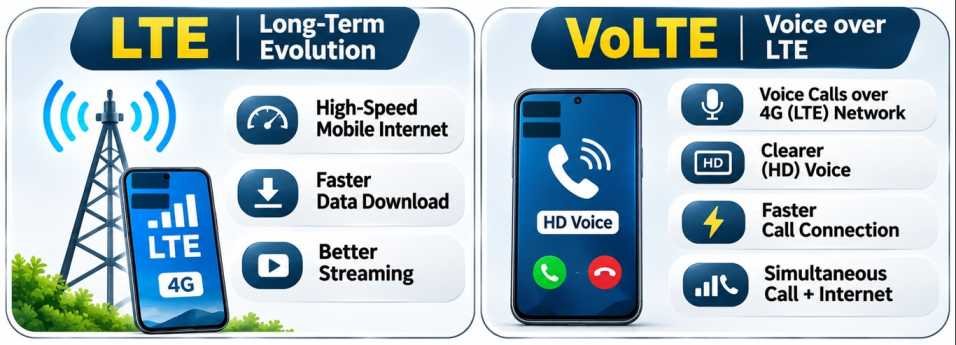
- LTE is a mobile broadband technology developed by the 3rd Generation Partnership Project (3GPP).
- It improves spectral efficiency and data performance over earlier mobile systems.
- It supports packet-based communication.
Voice over LTE (VoLTE)
- VoLTE provides voice communication through an LTE network using the IP Multimedia Subsystem (IMS).
- It allows supported networks and devices to deliver voice services without depending on older circuit-switched networks.
- Potential benefits include:
- High-definition voice.
- Faster call establishment.
- Efficient integration of voice and data.
| Feature | LTE | VoLTE |
|---|---|---|
| Meaning | Mobile broadband radio and network technology | IP-based voice service over LTE |
| Main function | Data and communication connectivity | Voice communication |
| Network relationship | Provides underlying LTE connectivity | Operates over suitable LTE infrastructure |
| Requirement | LTE-compatible device and network | VoLTE support, provisioning and compatible network |
Fifth Generation (5G)
- 5G is the fifth generation of mobile communication technology.
- It enables improvements in:
- Data capacity.
- Network efficiency.
- Communication latency.
- Device connectivity.
- Network flexibility.
- Important capabilities and service categories include:
Enhanced Mobile Broadband (eMBB)
- High-capacity mobile internet.
- High-resolution video.
- Immersive digital applications.
Ultra-Reliable Low-Latency Communications (URLLC)
- Designed for demanding industrial or mission-critical communication applications.
Massive Machine-Type Communications (mMTC)
- Supports large numbers of connected devices and sensors.
- Important 5G technologies include:
- 5G New Radio (NR).
- Massive Multiple-Input Multiple-Output (Massive MIMO).
- Beamforming.
- Network Slicing.
- Edge Computing.
- Sub-6 GHz and selected millimetre-wave frequency bands.
- Theoretical 5G peak rates may be much higher than ordinary user speeds.
- Real-world performance varies with network deployment, device capability, congestion and radio conditions.
Sixth Generation (6G)
- 6G refers to the next generation of mobile communication technology being developed after 5G.
- As of November 2026, 6G is a developing research and standardisation field rather than a fully established commercial mobile generation.
- Important research themes include:
- AI-native networking.
- Integrated sensing and communication.
- High-capacity radio links.
- Sub-THz and other advanced frequency technologies.
- Advanced antenna systems.
- Network energy efficiency.
- Secure and resilient connectivity.
- Integration of terrestrial and non-terrestrial networks.
- Potential applications include:
- Immersive communication.
- Advanced industrial automation.
- Connected robotics.
- Digital twins.
- Intelligent transport systems.
- Advanced remote sensing and localisation.
- Speeds of 1 Tbps and other exceptionally high figures frequently cited for 6G are research aspirations, not guaranteed standards or commercially available user data rates.
Mobile Network Generations: Comparison
| Generation | Main Era of Introduction | Major Characteristics | Typical Applications |
|---|---|---|---|
| 1G | 1980s | Analog cellular voice | Mobile telephone calls |
| 2G | 1990s | Digital voice, SMS and basic data | Calling and messaging |
| 3G | 2000s | Improved mobile internet | Web browsing and video calls |
| 4G | 2010s | High-speed IP-based broadband | Streaming and mobile applications |
| 5G | 2020s | High capacity, lower latency and advanced connectivity | Broadband, industrial IoT and intelligent networks |
| 6G | Research and standardisation during the 2020s | AI-native and next-generation communication capabilities under development | Proposed intelligent and immersive applications |
Bharat 6G Vision and Bharat 6G Alliance
- India launched the Bharat 6G Vision in 2023.
- The initiative aims to strengthen India’s contribution to future global telecommunications standards.
- Its objectives include:
- Indigenous 6G research.
- Intellectual property creation.
- Advanced communication testbeds.
- Domestic technology development.
- International standardisation participation.
- Industry–academia collaboration.
- The Bharat 6G Alliance (B6GA) is an industry-and-academia-led collaborative organisation.
- According to a government statement in July 2026, the Alliance had expanded to 90 members, with seven working groups covering major 6G technology and ecosystem areas.
India’s 6G Development Roadmap
| Phase | Period | Broad Priority |
|---|---|---|
| Phase I | 2023–2025 | Exploratory research, intellectual property and early standardisation |
| Phase II | 2026–2030 | Advanced testbeds, research demonstrations, industry participation and commercial-readiness development |
- The timeline represents development priorities rather than a guaranteed commercial launch date.
- Actual commercial implementation depends on international standards, spectrum allocation, equipment development and network investment.
SIM Technology, Mobile Access Methods and Satellite Phones
Subscriber Identity Module (SIM)
- A SIM is a secure subscriber identity application and associated storage environment used in mobile communication systems.
- It enables mobile networks to identify and authenticate subscribers.
- Important functions include:
- Subscriber identity management.
- Secure storage of authentication credentials.
- Support for network access.
- Selected communication-related information.
SIM and eSIM
| Feature | Physical SIM | eSIM |
|---|---|---|
| Physical form | Removable card | Embedded or integrated secure hardware implementation |
| Profile management | Often requires physical card insertion or replacement | Supports remote profile provisioning |
| Device design | Requires corresponding SIM interface | Can reduce the need for removable SIM access |
| Security | Depends on SIM and network implementation | Uses secure provisioning and authentication mechanisms |
| Typical devices | Phones, routers and communication devices | Modern smartphones, wearables and connected devices |
- eSIM stands for Embedded SIM.
- It enables remote provisioning of compatible subscriber profiles.
- An eSIM does not eliminate the need for a telecommunications subscription.
Mobile Network Access Techniques
| Technique | Expanded Form | Basic Principle |
|---|---|---|
| FDMA | Frequency Division Multiple Access | Users assigned different frequency resources |
| TDMA | Time Division Multiple Access | Users assigned different time slots |
| CDMA | Code Division Multiple Access | Users differentiated through spreading codes |
| OFDMA | Orthogonal Frequency Division Multiple Access | Users assigned groups of orthogonal subcarriers |
| SDMA | Space Division Multiple Access | Spatial separation through antenna systems |
- Modern mobile systems may combine several techniques.
- Multiple access improves utilisation of limited radio-frequency resources.
Satellite Phones
- A Satellite Phone communicates through satellite infrastructure rather than depending entirely on nearby terrestrial cellular towers.
- Satellite telephone systems may use:
- Geostationary satellites.
- Low Earth orbit satellite constellations.
- Other appropriate satellite architectures.
- Satellite phones can be useful in:
- Remote mountainous regions.
- Maritime operations.
- Disaster-response activities.
- Expeditions.
- Areas without cellular coverage.
- Limitations include:
- Equipment and service costs.
- Requirements for suitable sky visibility.
- Possible signal blockage.
- Regulatory restrictions in certain jurisdictions.
Satellite Phones versus Cellular Phones
| Feature | Satellite Phone | Cellular Phone |
|---|---|---|
| Communication infrastructure | Satellites and associated ground networks | Terrestrial cellular infrastructure |
| Coverage | Can reach remote areas within the operator’s service region | Depends on terrestrial network coverage |
| Typical cost | Often higher | Generally lower |
| Equipment | Specialised satellite-capable device | Standard cellular device |
| Major use | Remote and emergency communication | Everyday mobile communication |
| Limitations | Sky visibility, latency and service restrictions | Cellular coverage and network congestion |
Internet of Things, NFC and RFID
Internet of Things (IoT)
- The Internet of Things (IoT) refers to interconnected physical devices equipped with sensors, software, processing capabilities or communication interfaces.
- IoT systems enable devices to collect, exchange and use information.
- A typical IoT system contains:
- Sensors.
- Processing units.
- Communication interfaces.
- Software platforms.
- Data storage and analytics.
- Control mechanisms.
- The devices may communicate through local networks, the internet or other suitable connections.
- Not every IoT device must communicate directly with the public internet.
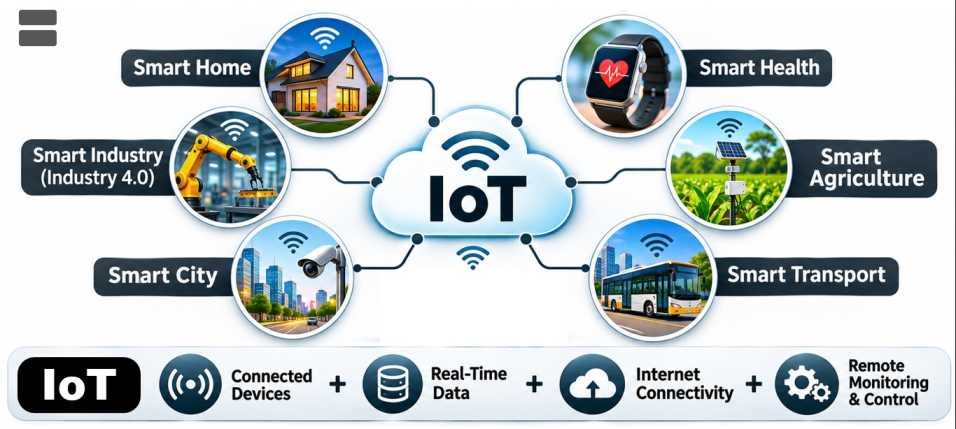
Working of IoT
- A sensor measures a physical condition.
- A controller processes the measurement.
- The information is transmitted to a local or remote system.
- Software analyses the data.
- An alert, decision or automated action is generated.
- The system may repeat the process continuously.
Sensor → Processing → Communication → Analysis → Action
Applications of IoT
| Sector | Applications |
|---|---|
| Agriculture | Soil-moisture monitoring and automated irrigation |
| Healthcare | Remote patient monitoring and connected medical devices |
| Industry | Predictive maintenance and equipment monitoring |
| Smart Cities | Smart street lighting and waste management |
| Transport | Vehicle tracking and traffic management |
| Energy | Smart meters and intelligent grids |
| Environment | Air-quality and water-quality monitoring |
| Homes | Smart appliances and automated security systems |
Near Field Communication (NFC)
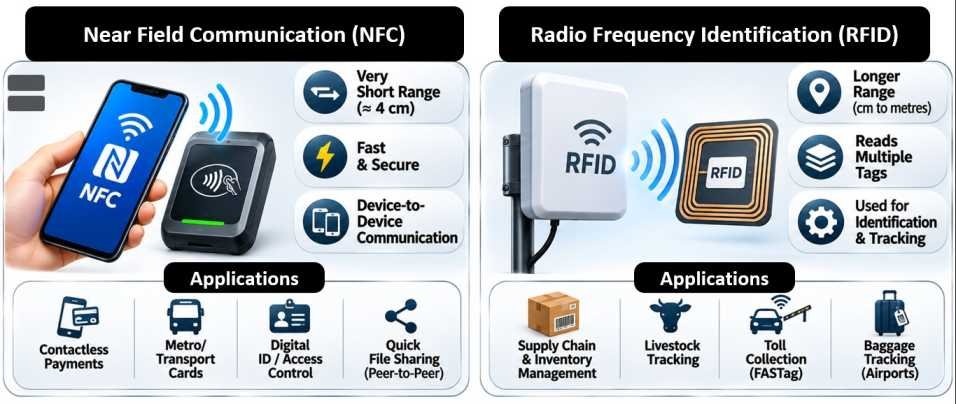
- NFC stands for Near Field Communication.
- It is a short-range wireless communication technology using electromagnetic coupling, typically at 13.56 MHz.
- It generally operates over distances of a few centimetres.
- NFC supports communication between compatible devices and tags.
- Important applications include:
- Contactless payments.
- Smart transport cards.
- Access control.
- Device pairing.
- Digital identity systems.
- Product information retrieval.
- NFC is closely related to certain RFID technologies but uses a specific set of protocols and operating characteristics.
Radio Frequency Identification (RFID)
- Radio Frequency Identification (RFID) uses radio-frequency signals to identify or exchange information associated with tagged objects.
- A typical RFID system consists of:
- RFID Tag.
- RFID Reader.
- Antenna.
- Processing or Database System.
- RFID can support identification without requiring direct visual contact between the tag and reader.
- The communication range varies according to frequency band, tag type, antenna design and environmental conditions.
Types of RFID Tags
1. Passive RFID Tags
- Do not normally contain their own battery-powered radio transmitter.
- Obtain operating energy from the reader’s electromagnetic field.
- Are relatively inexpensive and widely used.
- Applications include product identification, inventory systems and access cards.
2. Active RFID Tags
- Contain an onboard power source, commonly a battery.
- Can transmit signals over comparatively longer distances.
- Are often used in asset tracking and specialised industrial systems.
3. Battery-Assisted Passive RFID Tags
- Use a battery for selected tag functions.
- Communication may still depend on interaction with the reader.
- Can support improved sensing or operating capabilities in certain applications.
Working of RFID
- The reader generates an electromagnetic signal.
- A compatible tag receives or interacts with the signal.
- In a passive system, the tag obtains sufficient energy for its circuitry from the reader field.
- The tag communicates stored identification or associated data.
- The reader detects and decodes the response.
- Software may compare the information with a database.
- An automated action or record update can follow.
Applications of RFID
| Sector | Application |
|---|---|
| Retail | Inventory tracking and stock management |
| Logistics | Shipment identification and warehouse operations |
| Healthcare | Equipment, inventory and patient-identification systems |
| Libraries | Automated book identification and circulation |
| Access Control | Entry cards and secure access systems |
| Transportation | Electronic toll collection and vehicle identification |
| Agriculture | Livestock identification and monitoring |
| Manufacturing | Tracking parts through production lines |
| Sports | Timing and tracking participants |
| Public Services | Asset management and identification systems |
FASTag and RFID
- FASTag is an electronic toll-collection system used in India.
- It employs passive RFID technology to identify vehicles at toll plazas.
- The toll transaction is linked to the associated payment arrangement.
- FASTag helps reduce manual toll-processing requirements and can improve vehicle movement through toll facilities.
NFC, RFID and Bluetooth: Comparison
| Feature | NFC | RFID | Bluetooth |
|---|---|---|---|
| Primary purpose | Short-range interactive communication | Identification and data exchange with tags | Wireless device communication |
| Typical range | A few centimetres | Varies from centimetres to many metres | Usually metres to tens of metres, depending on version and implementation |
| Power arrangement | Active or passive roles | Passive, active or battery-assisted tags | Usually powered devices |
| Common applications | Payments and access cards | Inventory and asset tracking | Audio devices, wearables and peripherals |
| Communication protocol | NFC standards | Different RFID standards | Bluetooth specifications |
Internet, World Wide Web and Digital Networking Protocols
Meaning of the Internet
- The Internet is a global system of interconnected computer networks that communicate using standardised protocols.
- It links computers, servers, smartphones, data centres and other connected devices.
- The internet is a Network of Networks, meaning it connects independently operated networks across the world.
- Its fundamental communication architecture is based on the Internet Protocol Suite, commonly called TCP/IP.
- The internet supports:
- World Wide Web.
- Email.
- Video conferencing.
- File transfer.
- Online gaming.
- Cloud services.
- Digital payments.
- Electronic commerce.
- Machine-to-machine communication.
Working of the Internet
- Digital information is generally divided into smaller units called Packets for transmission.
- Packets carry information needed to deliver data across networks.
- Routers forward packets towards their destinations using network addresses and routing information.
- Packets may travel through different network paths.
- At the destination, networking software processes the packets and reconstructs or delivers the transmitted information according to the relevant protocols.
- Reliable transport protocols can detect missing data and arrange retransmission when required.
Basic sequence:
Source Device → Local Network → ISP → Internet Routers → Destination Network → Destination Device
Internet versus World Wide Web
| Basis | Internet | World Wide Web (WWW) |
|---|---|---|
| Meaning | Global interconnected network infrastructure | Information system containing interlinked web resources |
| Principal function | Data communication between networks | Accessing websites and web applications |
| Main technologies | IP, TCP, UDP and other networking protocols | HTTP, HTTPS, HTML, URLs and browsers |
| Dependency | Can support many services independently of the Web | Usually operates over the Internet |
| Examples | Email, online gaming, web services | Websites, web applications and web pages |
- The internet and the World Wide Web are not the same.
- The Web is one of the many services operating over the internet.
- The World Wide Web was developed by Tim Berners-Lee at CERN, beginning in 1989.
Internet Protocol (IP)
- Internet Protocol (IP) provides the addressing and forwarding framework used to deliver packets across interconnected networks.
- Two major versions are:
- IPv4.
- IPv6.
IPv4
- Uses 32-bit addresses.
- Supports approximately 4.3 billion unique address values.
- Example:
192.168.1.1. - The limited address space has encouraged the use of network address translation and the transition towards IPv6.
IPv6
- Uses 128-bit addresses.
- Provides a vastly larger address space.
- Example:
2001:db8::1. - Supports modern internet addressing, autoconfiguration and other networking capabilities.
IPv4 versus IPv6
| Feature | IPv4 | IPv6 |
|---|---|---|
| Address length | 32 bits | 128 bits |
| Address notation | Dotted decimal | Colon-separated hexadecimal |
| Address space | Approximately 4.3 billion | Approximately 3.4 × 1038 |
| Header | Variable-length basic header | Fixed 40-byte basic header |
| Broadcast | Supported | Replaced by multicast and other approaches |
| Address configuration | Manual or automated | Manual or automated, including SLAAC |
| Present status | Widely used | Increasingly deployed |
Domain Name System (DNS)
- The Domain Name System (DNS) translates domain names into corresponding DNS records, including IP addresses.
- It enables people to use readable website names rather than memorising numerical addresses.
- For example,
www.example.comcan be resolved to an IP address through DNS. - DNS is distributed across multiple servers and administrative levels.
- Important components include:
- Root name servers.
- Top-Level Domain servers.
- Authoritative name servers.
- Recursive resolvers.
- DNS also supports other functions, including mail-routing records and domain verification.
Internet Governance: ICANN and ITU
Internet Corporation for Assigned Names and Numbers (ICANN)
- ICANN is a nonprofit organisation involved in coordinating unique internet identifiers.
- Its responsibilities relate to:
- Domain-name system coordination.
- IP address allocation coordination through the relevant internet institutions.
- Protocol-parameter registry coordination.
- ICANN contributes to the stable and interoperable functioning of the global internet.
International Telecommunication Union (ITU)
- ITU is a specialised agency of the United Nations.
- Its headquarters are in Geneva, Switzerland.
- It supports international cooperation in telecommunications and ICT.
- Major functions include:
- Radio-frequency spectrum coordination.
- Satellite-orbit resource coordination.
- Telecommunication standards.
- Digital-development initiatives.
- International connectivity.
| Feature | ICANN | ITU |
|---|---|---|
| Institutional character | Nonprofit multistakeholder organisation | United Nations specialised agency |
| Major concern | Internet identifiers and DNS coordination | Global telecommunications and ICT |
| Important functions | Domain-name and identifier coordination | Spectrum, satellite coordination and standards |
| Scope | Internet naming and numbering systems | Broader telecommunications and digital development |
Web Browsers and Search Engines
Web Browser
- A Web Browser is software used to retrieve, interpret and display web resources.
- Examples include:
- Google Chrome.
- Mozilla Firefox.
- Microsoft Edge.
- Apple Safari.
- Opera.
Search Engine
- A Search Engine helps users find information on the Web.
- It typically uses:
- Crawling.
- Indexing.
- Ranking.
- Query processing.
- Examples include Google, Bing, DuckDuckGo and other search services.
| Web Browser | Search Engine |
|---|---|
| Software for opening websites and web applications | Service for discovering and searching web resources |
| Renders web pages | Indexes or searches information |
| Uses URLs and web protocols | Uses search queries |
| Examples: Chrome, Firefox | Examples: Google Search, Bing |
Important Web Terminology
| Term | Meaning |
|---|---|
| Website | Collection of related web resources under an identifiable web presence |
| Web Page | Individual web document or resource |
| URL | Uniform Resource Locator identifying the location of a resource |
| HTTP | Hypertext Transfer Protocol |
| HTTPS | HTTP secured using TLS |
| HTML | HyperText Markup Language |
| CSS | Cascading Style Sheets |
| JavaScript | Programming language widely used in web applications |
| Web Server | System delivering web resources |
| Web Hosting | Infrastructure used to make websites and services accessible |
| Cache | Storage of reusable data to improve performance |
| Cookie | Small data item stored by browsers for web-related functions |
| Session | Mechanism for maintaining application state across interactions |
Cookies and Cache
Cookies
- Cookies help websites maintain information associated with user visits.
- Uses include:
- Login sessions.
- Shopping carts.
- Personalisation.
- Security functions.
- Analytics and advertising.
- Cookies may be temporary or persistent.
- Their use can raise privacy concerns, particularly where tracking or behavioural profiling occurs.
Cache
- A cache temporarily stores frequently accessed information.
- Browser caching can reduce repeated downloads of images, scripts and other website resources.
- Caching can improve performance and reduce bandwidth consumption.
- Cached information may become outdated and may need to be refreshed.
Computer Networks, Routers, Modems and Internet Access
Meaning of Computer Networks
- A Computer Network is a system of interconnected devices capable of exchanging information and sharing resources.
- Networks connect computers, servers, printers, smartphones and other electronic devices.
- Their major benefits include:
- Data sharing.
- Resource sharing.
- Centralised administration.
- Communication.
- Access to internet services.
- Collaborative computing.
Personal Area Network (PAN)
- A Personal Area Network connects devices within a relatively small area around an individual.
- Examples include:
- Smartphone and wireless earphones.
- Smartwatch and smartphone.
- Laptop and wireless mouse.
- Common technologies include Bluetooth, USB and other short-range interfaces.
- PANs may be wired or wireless.
Local Area Network (LAN)
- A Local Area Network connects devices within a limited geographical area.
- Examples include:
- Homes.
- Offices.
- Schools.
- Computer laboratories.
- Individual buildings.
- Ethernet and Wi-Fi are widely used LAN technologies.
- LANs enable file sharing, printing and access to shared computing resources.
Metropolitan Area Network (MAN)
- A Metropolitan Area Network connects networks across a city or metropolitan area.
- It is larger than a typical LAN.
- Applications include:
- University networks.
- Municipal communication systems.
- Enterprise networks connecting multiple city locations.
Wide Area Network (WAN)
- A Wide Area Network connects devices or networks across extensive geographical areas.
- A WAN may connect:
- Multiple cities.
- States.
- Countries.
- Continents.
- WANs use technologies such as leased lines, optical fibre, radio links and satellite communication.
- The global internet connects numerous networks worldwide, including networks operating at WAN scale.
Storage Area Network (SAN)
- A Storage Area Network provides dedicated high-speed connectivity between servers and shared storage systems.
- It is primarily used in enterprise and data-centre environments.
- Benefits include:
- Centralised storage.
- Efficient data management.
- High availability.
- Support for business-critical applications.
Virtual Private Network (VPN)
- A Virtual Private Network creates a logical private communication path across another network, often the public internet.
- VPNs commonly use encryption and authentication to protect traffic between endpoints.
- Applications include:
- Secure remote work.
- Corporate network access.
- Protection of traffic across untrusted networks.
- Connecting geographically separated offices.
- A VPN does not automatically guarantee complete anonymity, prevent malware or protect against every form of tracking.
Intranet and Extranet
Intranet
- A private network or collection of digital services intended primarily for use within an organisation.
- It supports internal communication, document management and administrative processes.
Extranet
- A controlled extension of organisational network services to authorised external users.
- External users may include suppliers, contractors or business partners.
- It enables collaboration without making internal systems completely public.
Types of Networks: Comparison
| Network | Typical Scope | Major Applications |
|---|---|---|
| PAN | Individual surroundings | Wearables and personal peripherals |
| LAN | Home, office or building | Local data and resource sharing |
| MAN | City or metropolitan area | Municipal and enterprise connectivity |
| WAN | Extensive geographical regions | Long-distance communication |
| SAN | Data-centre storage environment | Shared storage systems |
| VPN | Logical private connection over another network | Remote and protected connectivity |
| Intranet | Private organisational network | Internal services |
| Extranet | Controlled external organisational access | Partner and supplier collaboration |
Modem and Router
Modem
- A Modem provides an interface between a local device or network and a communication service.
- Traditionally, the name comes from Modulator–Demodulator.
- In modern broadband systems, the precise function depends on the access technology.
- Examples include:
- DSL modem.
- Cable modem.
- Cellular modem.
- Optical Network Terminal (ONT), used in fibre services.
Router
- A Router connects IP networks and forwards packets between them.
- It selects forwarding paths using routing information.
- Home routers commonly provide additional functions such as:
- Network Address Translation (NAT).
- DHCP.
- Firewall features.
- Wi-Fi access.
- Local network administration.
| Feature | Modem / Access Terminal | Router |
|---|---|---|
| Primary function | Interfaces with an internet access service | Connects networks and forwards packets |
| IP routing | May be absent or integrated | Principal function |
| Local network management | May be limited | Commonly supported |
| Wi-Fi | Not necessarily available | Often integrated in consumer models |
| Typical role | Connects to ISP access medium | Shares connectivity among network devices |
Ways of Accessing the Internet
1. Optical Fibre Broadband
- Uses optical fibre to transmit data.
- Provides high-capacity and often low-latency connectivity.
2. DSL
- Uses suitable copper telephone lines for digital broadband.
- Performance depends on line quality and distance.
3. Cable Broadband
- Uses cable television-related network infrastructure.
- Often relies on hybrid fibre-coaxial networks.
4. Cellular Broadband
- Uses mobile networks such as 4G and 5G.
- Supports portable connectivity.
5. Satellite Broadband
- Uses satellite communication links.
- Particularly useful where terrestrial connectivity is difficult or unavailable.
6. Wi-Fi
- Provides local wireless connectivity.
- Usually connects users to an underlying broadband, mobile or other network service.
7. Ethernet
- Provides wired network connectivity.
- Commonly used in offices, homes and data centres.
8. Dial-Up
- Historically used telephone networks and modems to establish low-speed data connections.
- Has largely been superseded by broadband services.
Wireless Networks: Wi-Fi, Bluetooth, Li-Fi, Zigbee and Satellite Internet
Wi-Fi
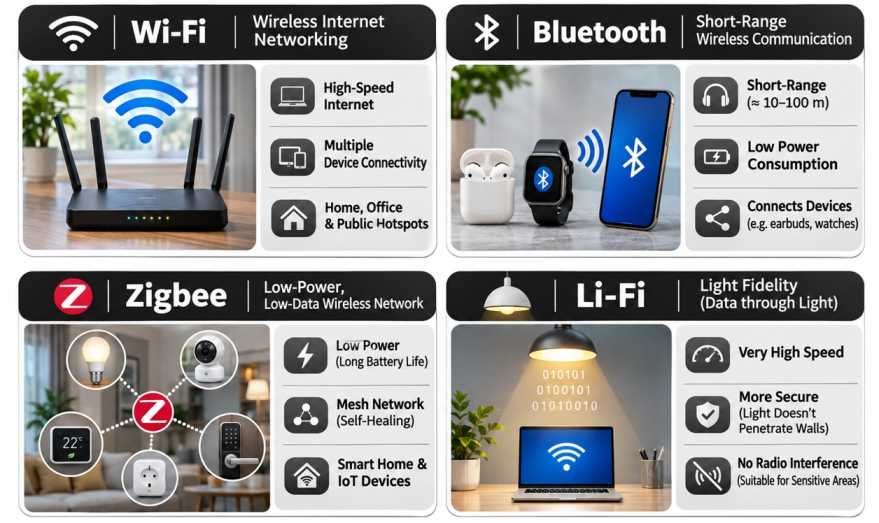
- Wi-Fi is a family of wireless local-area-network technologies based on IEEE 802.11 standards.
- It enables compatible devices to exchange data over short to moderate distances.
- Wi-Fi commonly operates in the:
- 2.4 GHz band.
- 5 GHz band.
- 6 GHz band in jurisdictions and equipment where authorised.
- Major applications include:
- Home internet connectivity.
- Office networks.
- Educational institutions.
- Public hotspots.
- Smart-home systems.
- Security mechanisms include WPA2 and WPA3, which support authentication and encryption.
- Actual speed and range depend on the standard, channel width, interference, signal strength and number of users.
Bluetooth
- Bluetooth is a short-range wireless technology operating primarily in the 2.4 GHz ISM band.
- It enables communication between nearby compatible devices.
- Applications include:
- Wireless headphones.
- Speakers.
- Keyboards and mice.
- Wearable devices.
- Medical and fitness sensors.
- Device-to-device data exchange.
- Bluetooth Low Energy (BLE) is designed for applications requiring low-power communication.
Zigbee
- Zigbee is a low-power wireless networking technology commonly associated with IEEE 802.15.4.
- It is designed for applications involving low data rates and energy efficiency.
- It can support mesh networking.
- Common applications include:
- Smart lighting.
- Home automation.
- Industrial sensors.
- Environmental monitoring.
- Building management.
Li-Fi
- Li-Fi (Light Fidelity) refers to wireless communication using light rather than conventional radio waves.
- Information is transmitted by rapidly modulating light emitted by a suitable optical source.
- Compatible receivers detect the modulated optical signals.
- Potential applications include:
- Indoor communication.
- Specialised industrial environments.
- Locations where radio-frequency interference is a concern.
- High-capacity optical wireless links.
Advantages
- Access to optical spectrum resources.
- Potentially high data rates.
- Reduced electromagnetic radio-frequency interference.
- Spatial confinement of signals in certain configurations.
Limitations
- Blockage by opaque obstacles.
- Dependence on suitable optical paths.
- Coverage constraints.
- Need for specialised optical communication equipment.
- Ambient-light and installation considerations.
Wi-Fi versus Li-Fi
| Feature | Wi-Fi | Li-Fi |
|---|---|---|
| Transmission medium | Radio waves | Optical radiation |
| Typical environment | Indoor and outdoor wireless networking | Primarily suitable optical communication environments |
| Wall penetration | Possible, depending on construction and frequency | Visible-light links generally do not pass through opaque walls |
| Equipment | Radio antennas | Optical emitters and receivers |
| Major challenge | Radio interference and spectrum congestion | Optical blockage and link coverage |
| Applications | General wireless networking | Specialised optical wireless communication |
Satellite Networks
- A Satellite Network uses one or more satellites to support communication between ground-based, airborne or other terminals.
- It generally consists of:
- Satellites.
- Ground stations.
- User terminals.
- Gateways.
- Network-control infrastructure.
- Satellite networks support:
- Television broadcasting.
- Telecommunication.
- Broadband internet.
- Remote connectivity.
- Maritime and aviation services.
- Navigation and monitoring systems.
Geostationary Satellite Internet
- Geostationary Satellites orbit approximately 35,786 km above Earth’s equator.
- They remain at nearly fixed apparent positions above the equator.
- Advantages include:
- Large regional coverage.
- Continuous visibility over designated service areas.
- Relatively few satellites required for extensive regional service.
- Challenges include:
- Greater signal-propagation delay.
- Limited coverage of high polar regions.
- High launch and satellite costs.
- Capacity and spectrum constraints.

Low Earth Orbit Satellite Internet
- LEO broadband networks use satellites in orbits generally below 2,000 kilometres.
- Their lower altitude can reduce signal latency compared with GEO satellite systems.
- Continuous service generally requires multiple satellites working as a coordinated constellation.
- Advantages include:
- Lower propagation delay.
- Coverage of geographically remote areas.
- Potential integration with terrestrial networks.
- Challenges include:
- Large constellation requirements.
- Frequent satellite movement relative to the user.
- Handover complexity.
- Orbital debris and collision risks.
- Radio-frequency coordination.
- Environmental and astronomical impacts.
Medium Earth Orbit Satellite Networks
- MEO Satellites occupy orbital altitudes between LEO and geosynchronous orbit.
- They provide an intermediate balance of coverage and propagation delay.
- MEO networks may be used for:
- Navigation.
- Broadband connectivity.
- Specialised communication services.
- Fewer satellites may be required compared with LEO constellations, depending on the desired coverage and service architecture.
Starlink and Satellite-Based Broadband
- Starlink is a satellite broadband system developed by SpaceX.
- It uses a large constellation of satellites in low Earth orbit.
- Its objective is to provide internet connectivity through satellite user terminals.
- Starlink is one example of a broader industry shift towards LEO broadband constellations.
- Other satellite broadband systems use different orbital architectures and commercial models.

Satellite Broadband: Advantages and Challenges
| Advantages | Challenges |
|---|---|
| Connectivity in remote areas | High infrastructure and deployment costs |
| Rapid communication deployment | Spectrum coordination requirements |
| Useful for disaster response | Orbital debris and collision risks |
| Supplements terrestrial networks | Weather and link-quality effects |
| Can serve maritime and aviation users | Terminal and subscription costs |
| Supports geographically dispersed populations | Cybersecurity and space-system resilience concerns |
Evolution of the World Wide Web
- The World Wide Web has evolved from a collection of relatively static pages into an ecosystem of interactive applications, digital platforms and intelligent services.
- The terms Web 1.0, Web 2.0, Web 3.0, Web 4.0 and Web 5.0 are commonly used to describe different ideas about this evolution.
- These categories are conceptual and do not represent universally recognised technical standards with fixed beginning and ending dates.
- In particular, descriptions of Web 3.0, Web 4.0 and Web 5.0 vary among researchers and technology organisations.
Web 1.0: The Read-Oriented Web
- Web 1.0 generally refers to the early period of the publicly accessible World Wide Web.
- It was characterised by relatively static websites with limited interactive functionality.
- Users primarily consumed information published by website operators.
- Common features included:
- Static HTML pages.
- Hyperlinks.
- Online directories.
- Simple web-based publishing.
- Limited interactive applications.
- It is often described as the Read-Only Web, although the early Web did contain interactive technologies.
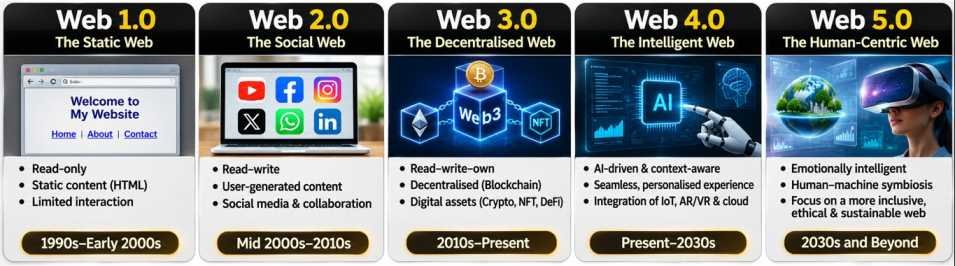
Web 2.0: The Participatory Web
- Web 2.0 describes the expansion of interactive, collaborative and user-generated web services.
- It became prominent during the early and mid-2000s.
- Important characteristics include:
- User-generated content.
- Social networking.
- Blogging.
- Collaborative editing.
- Interactive websites.
- Online communities.
- Cloud-based applications.
- Examples include social media platforms, online encyclopedias, content-sharing websites and collaborative digital services.
- Web 2.0 significantly expanded opportunities for public participation in online information creation.
Web 3.0: Semantic Web and Decentralised Web
- Web 3.0 is used in two prominent but distinct contexts.
1. Semantic Web
- A framework for making web information more understandable and processable by machines.
- Uses structured information, metadata, linked data and semantic relationships.
- Aims to improve information integration, discovery and automated processing.
2. Decentralised Web or Web3
- Emphasises reduced dependence on centralised platforms.
- Often involves:
- Blockchain.
- Distributed applications.
- Cryptographic identity.
- Digital tokens.
- Smart contracts.
- These two interpretations should not be treated as identical.
- Decentralisation may provide new models of digital participation, but it also creates governance, security, usability and regulatory challenges.
Web 4.0: Intelligent and Connected Web
- Web 4.0 is an informal term used to describe a possible more intelligent and interconnected digital environment.
- Its proposed characteristics include:
- Advanced artificial intelligence.
- Context-aware services.
- Integration of physical and digital systems.
- Intelligent personal assistants.
- Automation.
- Real-time information exchange.
- Human-machine interaction.
- Such technologies are developing through AI, IoT and advanced computing.
- Web 4.0 is not an officially standardised generation of the internet.
Web 5.0: Proposed Future Concepts
- Web 5.0 is a speculative term applied to different possible models of future digital interaction.
- Some descriptions emphasise:
- Emotion-aware systems.
- Intelligent human-computer interaction.
- Immersive interfaces.
- Advanced AI systems.
- Greater user control over digital identity.
- Other uses of the term focus on decentralised identity and personal data control.
- There is no universal definition or agreed technical standard for Web 5.0.
- Predictions concerning its features and commercial deployment should therefore be regarded as conceptual rather than established facts.
Comparison of Web Generations
| Feature | Web 1.0 | Web 2.0 | Web 3.0 | Web 4.0 | Web 5.0 |
|---|---|---|---|---|---|
| Central concept | Information publishing | User participation | Semantic intelligence or decentralisation | Intelligent connected systems | Speculative advanced interaction |
| User role | Mainly reader | Reader and creator | Data participant or digitally autonomous user | Participant in intelligent systems | Proposed personalised human-machine interaction |
| Technologies | HTML and hyperlinks | Social platforms and interactive applications | Linked data, AI or blockchain | AI, IoT and automation | Proposed advanced AI and interfaces |
| Development | Historically established | Historically established | Developing, with multiple meanings | Conceptual and developing | Speculative |
| Examples | Static websites | Social networks, collaborative platforms | Semantic-data applications, decentralised applications | AI-integrated connected services | Proposed future systems |
Metaverse, AR and VR
- The Metaverse refers to concepts involving interconnected immersive digital environments.
- It may incorporate:
- Virtual Reality (VR).
- Augmented Reality (AR).
- Mixed Reality (MR).
- Digital avatars.
- Real-time virtual interaction.
- Digital commerce.
- Virtual Reality creates a computer-generated environment experienced through suitable devices.
- Augmented Reality overlays digital information onto a user’s perception of the physical environment.
- Mixed Reality combines physical and digital elements with varying levels of interaction.
- Applications include education, simulation, industrial training, architecture and entertainment.
- Challenges include motion sickness, hardware costs, privacy, accessibility and online safety.
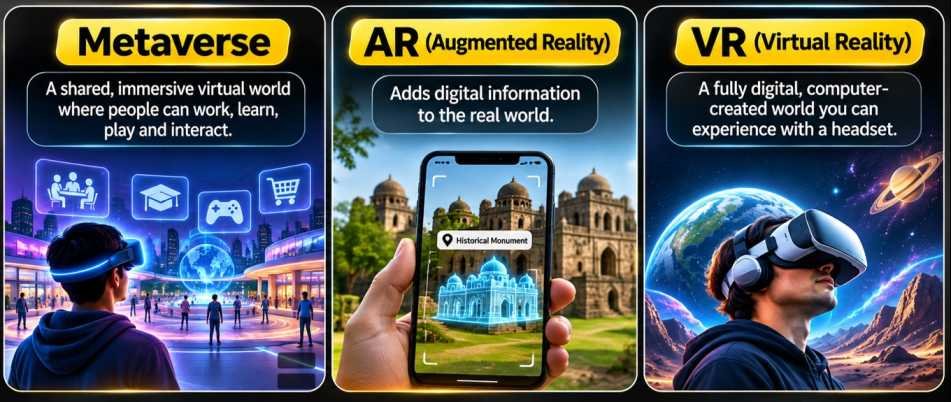
Cryptography, Encryption, Hashing and Digital Signatures
Meaning of Cryptography
- Cryptography is the science of securing information through mathematical techniques and computational methods.
- It helps protect:
- Confidentiality.
- Integrity.
- Authenticity.
- Secure communication.
- Verification of information.
- Cryptographic techniques are used in online banking, electronic commerce, digital identity systems and secure communication.
Encryption
- Encryption converts readable information called Plaintext into an encoded form called Ciphertext.
- The purpose is to prevent unauthorised parties from understanding the protected information.
- A cryptographic algorithm uses a Key to perform encryption.
- An authorised party uses the appropriate key and algorithm to decrypt the information.
Plaintext → Encryption → Ciphertext → Decryption → Plaintext
Symmetric-Key Encryption
- Symmetric Encryption uses the same secret key, or closely related secret-key material, for encryption and decryption.
- It is widely used for protecting large amounts of digital data.
- Important examples include:
- Advanced Encryption Standard (AES).
- Other approved symmetric cryptographic algorithms.
Advantages
- High computational efficiency.
- Suitable for bulk data encryption.
- Widely used in storage and communication systems.
Limitation
- The communicating parties must securely establish or share the secret key.
Asymmetric-Key Cryptography
- Asymmetric Cryptography, also called Public-Key Cryptography, uses mathematically related keys.
- A typical key pair contains:
- Public Key.
- Private Key.
- The keys are used for functions such as encryption, digital signatures and key establishment.
- Examples include:
- RSA.
- Elliptic Curve Cryptography (ECC).
- Other public-key algorithms.
- The roles of public and private keys differ according to the cryptographic operation.
Symmetric versus Asymmetric Cryptography
| Feature | Symmetric Cryptography | Asymmetric Cryptography |
|---|---|---|
| Key arrangement | Shared secret key | Public-private key pair |
| Computational performance | Generally efficient for bulk data | Usually more computationally intensive |
| Major use | Data encryption | Key establishment, signatures and selected encryption |
| Key distribution | Secret key must be established securely | Public key can be distributed, subject to authentication |
| Examples | AES | RSA, ECC |
Hashing
- A Cryptographic Hash Function converts input data into a fixed-length output called a Hash Value or Digest.
- A secure cryptographic hash function is designed to possess properties such as:
- Preimage resistance.
- Second-preimage resistance.
- Collision resistance.
- Hash functions are used in:
- File-integrity verification.
- Digital signatures.
- Blockchain systems.
- Secure data structures.
- Password-verification systems when combined with appropriate password-hashing methods.
- Hashing is not encryption because it does not involve an ordinary reversible decryption process.
- Passwords should generally be processed using specialised password-hashing or key-derivation methods rather than stored using fast, unsalted general-purpose hashes.
Hashing versus Encryption
| Feature | Hashing | Encryption |
|---|---|---|
| Purpose | Integrity and related verification | Confidentiality |
| Reversibility | Designed to be one-way | Reversible with appropriate key |
| Output | Fixed-length digest for a given algorithm | Ciphertext, usually related to input length |
| Key | Standard hashes do not require a key | Encryption uses cryptographic keys |
| Applications | Integrity checks, digital signatures | Secure storage and communication |
Digital Signatures
- A Digital Signature is a cryptographic mechanism used to verify the authenticity and integrity of digital information.
- It commonly involves:
- A private signing key.
- A corresponding public verification key.
- A digital-signature algorithm.
Working Process
- The signer prepares the digital document.
- The signing algorithm uses the signer’s private key and the document information to generate a signature.
- The signature accompanies the document.
- The recipient uses the corresponding public key to verify the signature.
- Successful verification provides evidence that the document has not been altered since signing and that the signature was generated using the corresponding private key, subject to the security of the keys and identity-verification framework.
Digital Signatures versus Ordinary Electronic Signatures
| Feature | Digital Signature | Electronic Signature |
|---|---|---|
| Meaning | Cryptographic signature mechanism | Broader category of electronic signing methods |
| Technology | Uses cryptographic algorithms | May use different electronic mechanisms |
| Integrity verification | Strong cryptographic verification | Depends on implementation |
| Identity assurance | Depends on key and certificate management | Depends on the signing method |
| Legal status | Recognised under applicable law | Recognised according to applicable legal requirements |
Digital Signatures in India
- India’s Information Technology Act, 2000 provides a legal framework for electronic records and electronic authentication.
- The law recognises digital signatures and specified electronic signature mechanisms.
- Digital Signature Certificates (DSCs) are issued through licensed certifying authorities within the applicable public-key infrastructure.
- Their uses include:
- Electronic filing.
- Government procurement.
- Company-related filings.
- Electronic contracts.
- Other legally recognised digital transactions.
Blockchain
- Blockchain is a type of distributed ledger technology.
- It records information in linked blocks or other structures according to an agreed protocol.
- Many blockchain systems use cryptographic hashes to connect records and detect unauthorised changes.
- Potential applications include:
- Supply-chain traceability.
- Digital asset systems.
- Identity verification.
- Selected record-management applications.
- Financial technologies.
- Blockchain does not automatically guarantee privacy, factual correctness, decentralisation or immunity from fraud.
- Its suitability depends on governance, consensus methods, participant access and security design.
Cloud Computing, Data Centres and Digital Infrastructure
Cloud Computing
- Cloud Computing enables users to obtain computing resources over a network through scalable, on-demand services.
- Resources may include:
- Servers.
- Storage.
- Databases.
- Networking.
- Software.
- Development environments.
- Artificial intelligence services.
- Cloud computing reduces the need for every organisation to maintain all computing infrastructure on its own premises.
- Cloud services commonly use resource pooling, virtualisation, automation and measured service models.
Essential Characteristics
- On-Demand Self-Service: Users can provision computing resources when required.
- Broad Network Access: Services are accessible through compatible networks.
- Resource Pooling: Computing resources are shared among different workloads or customers.
- Rapid Elasticity: Capacity can increase or decrease according to demand.
- Measured Service: Resource consumption can be monitored and billed.
Cloud Computing Service Models
1. Infrastructure as a Service (IaaS)
- Provides virtualised computing infrastructure.
- Users can manage virtual machines, operating systems, applications and selected network settings.
- Examples include virtual computing and infrastructure services from major cloud providers.
2. Platform as a Service (PaaS)
- Provides managed development and deployment environments.
- Developers can build and operate applications without directly managing all underlying infrastructure.
- Examples include managed application platforms and cloud development environments.
3. Software as a Service (SaaS)
- Provides software applications through a network.
- Users generally access the software through web browsers or compatible applications.
- Examples include online office suites, collaboration platforms and cloud-based business applications.
4. Function as a Service (FaaS)
- Allows developers to execute event-driven code without managing the underlying servers directly.
- Often associated with Serverless Computing.
- Billing and capacity allocation commonly depend on execution and resource usage.
5. Storage as a Service
- Provides remote storage facilities.
- Supports backup, archiving, file storage and object storage.
6. Database as a Service (DBaaS)
- Provides managed database infrastructure.
- Reduces the burden of server maintenance, backup administration and certain operational tasks.
7. Desktop as a Service (DaaS)
- Delivers managed virtual desktop environments through network connections.
- Useful for selected remote-work and enterprise requirements.
Comparison of Cloud Service Models
| Service Model | Provider Typically Manages | Customer Typically Manages |
|---|---|---|
| IaaS | Physical infrastructure and virtualisation | Operating systems, applications and data |
| PaaS | Infrastructure and managed application platform | Application code and data |
| SaaS | Application and underlying infrastructure | User data, settings and access permissions |
| FaaS | Execution platform and infrastructure | Functions, application logic and relevant data |
The precise distribution of responsibilities varies by provider and service configuration.
Cloud Deployment Models
1. Public Cloud
- Cloud infrastructure provided to multiple customers by a cloud provider.
- Resources are managed through the provider’s service environment.
2. Private Cloud
- Cloud infrastructure dedicated to one organisation.
- May operate on-premises or through an external provider.
3. Hybrid Cloud
- Combines private and public computing environments.
- Enables workload and data distribution across interconnected environments.
4. Community Cloud
- Shared by organisations with common operational, security or regulatory requirements.
5. Multi-Cloud
- Uses services from more than one cloud provider.
- May improve flexibility but can increase management complexity.
Benefits of Cloud Computing
- Cost Flexibility: Reduces the need for some upfront infrastructure investment.
- Scalability: Resources can be adjusted to workload requirements.
- Accessibility: Supports remote access and distributed collaboration.
- High Availability: Well-designed services can provide redundancy and resilience.
- Innovation: Facilitates development and testing.
- Disaster Recovery: Enables replication and backup strategies.
- AI and Analytics: Provides access to computing platforms for data-intensive applications.
Challenges of Cloud Computing
- Data Security: Misconfiguration or weak access control can expose information.
- Privacy: Sensitive data requires appropriate protection and lawful processing.
- Vendor Lock-In: Dependence on a provider’s tools may complicate migration.
- Network Dependence: Remote services can be affected by connectivity problems.
- Service Outages: Cloud infrastructure is not immune to failure.
- Cost Management: Poorly managed resource consumption can create unexpected expenses.
- Regulatory Compliance: Data handling must satisfy applicable legal requirements.
- Environmental Impact: Data centres consume electricity, cooling resources and materials.
Data Centres
- A Data Centre is a facility housing computing, storage and networking infrastructure.
- Its main components include:
- Servers.
- Storage devices.
- Network switches and routers.
- Power distribution systems.
- Cooling systems.
- Physical security systems.
- Fire detection and protection systems.
- Data centres support cloud computing, online applications, digital banking and internet services.
- Important design considerations include:
- Availability.
- Redundancy.
- Energy efficiency.
- Cybersecurity.
- Physical security.
- Cooling efficiency.
MeghRaj: Government of India’s Cloud Initiative
- MeghRaj, also known as the GI Cloud Initiative, is associated with the Government of India’s adoption of cloud computing.
- Its principal purpose is to facilitate cloud-based delivery of government digital services.
- It supports the development and use of cloud infrastructure and services within government systems.
Objectives
- Improve utilisation of computing resources.
- Reduce duplication of infrastructure.
- Improve scalability of government applications.
- Support digital service delivery.
- Strengthen interoperability.
- Facilitate appropriate security and governance controls.
Benefits
- Potential cost savings.
- Better deployment flexibility.
- Improved resource utilisation.
- Faster implementation of selected applications.
- Support for government digital transformation.
- MeghRaj should be understood as a government cloud initiative and policy framework rather than as a single computer or single centrally located data centre.
Cybersecurity, Malware, Electronic Surveillance and Data Protection
Meaning of Cybersecurity
- Cybersecurity refers to practices, technologies and procedures used to protect computer systems, networks, digital devices and information from cyber threats.
- Its principal objectives are often described through the CIA Triad:
- Confidentiality: Preventing unauthorised disclosure of information.
- Integrity: Protecting information against unauthorised modification.
- Availability: Ensuring systems and information remain accessible when required.
- Cybersecurity involves technical, organisational, legal and human dimensions.
- Major protected assets include:
- Personal information.
- Financial records.
- Government databases.
- Communication systems.
- Critical infrastructure.
- Industrial control systems.
Malware
- Malware means Malicious Software.
- It refers to software intentionally designed to perform harmful, unauthorised or deceptive actions.
- Malware may be used to:
- Steal information.
- Disrupt services.
- Damage systems.
- Obtain unauthorised access.
- Encrypt files for extortion.
- Monitor user activities.
Major Types of Malware
| Malware Type | Important Characteristics |
|---|---|
| Computer Virus | Attaches to files or programs and may spread when infected content is executed |
| Worm | Can replicate and propagate through networks or systems |
| Trojan Horse | Disguises malicious functionality as legitimate software |
| Ransomware | Encrypts, steals or restricts access to information for extortion |
| Spyware | Secretly monitors or collects information |
| Adware | Displays advertising, potentially with intrusive or malicious behaviour |
| Rootkit | Conceals unauthorised activity and may enable persistent privileged access |
| Bot Malware | Allows compromised devices to be controlled remotely |
| Keylogger | Records keystrokes or other user inputs |
| Wiper Malware | Intentionally destroys or corrupts information |
| Cryptojacking Malware | Misuses computing resources for cryptocurrency mining |
Computer Virus
- A Computer Virus typically attaches to another file, document or executable program.
- It may spread when infected content is executed or processed.
- Viruses can:
- Corrupt information.
- Modify files.
- Reduce system performance.
- Deliver other malicious software.
- Unlike a worm, a conventional virus generally depends on some host file or executable mechanism for propagation.
Computer Worm
- A Computer Worm is malware capable of self-replication and propagation.
- Worms may exploit vulnerabilities or other mechanisms to spread between systems.
- They can cause:
- Network congestion.
- System instability.
- Unauthorised data access.
- Service disruption.
Examples
- Morris Worm (1988).
- Conficker.
- SQL Slammer.
- Worm-like propagation mechanisms used in certain major cyberattacks.
Trojan Horse
- A Trojan Horse is malicious software disguised as a legitimate or useful program.
- Its objective is to persuade users or systems to execute harmful code.
- Unlike conventional viruses or worms, a Trojan is not defined by self-replication.
- Trojans may enable:
- Data theft.
- Remote unauthorised access.
- Installation of additional malware.
- Financial fraud.
Ransomware
- Ransomware is malware used to extort victims by restricting access to systems or information.
- Some ransomware encrypts data, while other forms also steal information and threaten public disclosure.
- Major consequences include:
- Business interruption.
- Data loss.
- Financial damage.
- Exposure of confidential information.
- Disruption of critical services.
Important Examples
- WannaCry (2017).
- NotPetya (2017), which caused widespread destructive damage.
- Ransomware families such as LockBit and Ryuk.
Spyware and Pegasus
- Spyware is software designed to collect information or monitor activity without appropriate authorisation.
- It may access:
- Messages.
- Contact information.
- Location data.
- Files.
- Microphones.
- Cameras.
Pegasus
- Pegasus is sophisticated commercial surveillance spyware associated with the Israeli company NSO Group.
- It has been used to compromise mobile devices.
- Some documented exploitation techniques have involved zero-click vulnerabilities, which may permit infection without a victim opening a malicious link.
- Pegasus has attracted international attention because of allegations and investigations concerning surveillance of journalists, activists, political figures and other individuals.
- Surveillance capabilities create serious questions involving privacy, legality, oversight and human rights.
Stuxnet
- Stuxnet was a sophisticated malware programme publicly identified in 2010.
- It targeted industrial control systems associated with Iran’s nuclear programme.
- The attack demonstrated that malicious software could cause physical disruption through the manipulation of industrial equipment.
- Stuxnet represents an important example of the intersection between cybersecurity, critical infrastructure and national security.
Bugs versus Malware
| Feature | Software Bug | Malware |
|---|---|---|
| Meaning | Defect or error in software | Intentionally harmful software |
| Intent | Usually unintentional | Malicious or unauthorised purpose |
| Cause | Coding errors, design flaws or unexpected interactions | Deliberate creation or deployment |
| Consequences | Incorrect functioning, crashes or vulnerabilities | Data theft, disruption or unauthorised control |
| Security relationship | May create exploitable weaknesses | May exploit software weaknesses |
Major Cyberattack Techniques
1. Phishing
- Fraudulent messages or websites designed to deceive users into revealing information or performing harmful actions.
2. Spear Phishing
- Targeted phishing directed at specific individuals or organisations.
3. Distributed Denial of Service (DDoS)
- Attempts to overwhelm a service with traffic or requests originating from multiple sources.
4. Zero-Day Exploitation
- Exploitation of a vulnerability for which an effective patch may not yet be available.
5. SQL Injection
- Exploitation of insecure database-query handling through malicious input.
6. Credential Theft
- Unauthorised acquisition of usernames, passwords or authentication tokens.
7. Supply-Chain Attack
- Compromise introduced through software suppliers, updates, service providers or other dependencies.
8. Juice Jacking
- A term describing potential attempts to exploit certain data-capable charging connections for unauthorised access or data compromise.
- The actual risk depends on device design, software protections and the charging arrangement.
9. Whaling
- A targeted phishing technique directed at senior executives or other high-profile individuals.
10. Skimming
- Unauthorised collection of payment-card information, often associated with compromised payment terminals or card-reading equipment.
Cybersecurity Protection Measures
- Multi-Factor Authentication (MFA): Requires additional authentication factors beyond a password.
- Software Updates: Fix known vulnerabilities.
- Strong Authentication: Uses appropriate password and credential-management practices.
- Data Encryption: Protects confidential information.
- Regular Backups: Supports recovery following data loss or ransomware incidents.
- Network Segmentation: Limits the spread of compromises.
- Endpoint Protection: Detects or blocks selected malicious activity.
- Access Control: Restricts privileges according to legitimate operational requirements.
- Security Awareness: Reduces risks arising from social engineering.
- Incident Response Planning: Establishes procedures for detecting, containing and recovering from cyber incidents.
Electronic Surveillance Disclosures
- In 2013, former US intelligence contractor Edward Snowden disclosed documents concerning extensive electronic surveillance programmes.
- The disclosures revealed information about intelligence collection and data-access arrangements involving communication infrastructure.
- They generated worldwide debates about:
- Privacy.
- National security.
- Government surveillance.
- Intelligence oversight.
- Digital rights.
- Cross-border data access.
- The disclosures raised questions about the proportionality and legal authorisation of surveillance activities.
- Electronic surveillance can serve legitimate security purposes, but it also requires safeguards against unlawful or excessive intrusion.
Electronic Surveillance and Privacy in India
- Electronic interception, monitoring and data access are governed by several Indian legal provisions and procedural requirements.
- Important laws and frameworks include:
- Information Technology Act, 2000.
- Telecommunications Act, 2023.
- Applicable rules, safeguards and lawful authorisation procedures.
- Constitutional protections relating to privacy.
- The Supreme Court recognised the Right to Privacy as a Fundamental Right in Justice K. S. Puttaswamy (Retd.) v. Union of India (2017).
- Government surveillance measures must be assessed against applicable constitutional and legal requirements.
- Privacy protection, national security and lawful investigations require careful institutional balancing.
Digital Personal Data Protection Act, 2023
- The Digital Personal Data Protection (DPDP) Act, 2023 provides a framework for the processing of digital personal data in India.
- It establishes obligations for entities handling personal information and rights for individuals whose data is processed.
- Important concepts include:
- Data Principal: Individual to whom the personal data relates.
- Data Fiduciary: Entity determining the purpose and means of processing personal data.
- Data Processor: Entity processing personal data on behalf of a Data Fiduciary.
- Important principles include:
- Lawful processing.
- Consent and transparency, subject to applicable exceptions.
- Purpose limitation.
- Data minimisation.
- Accuracy.
- Security safeguards.
- Accountability.
DPDP Rules, 2025
- The Government notified the Digital Personal Data Protection Rules, 2025, on 14 November 2025.
- These rules provide implementation arrangements under the DPDP Act.
- The framework includes provisions concerning:
- Notices and consent requirements.
- Data protection obligations.
- Data breach-related procedures.
- Rights of Data Principals.
- Institutional arrangements.
- Compliance requirements.
- The implementation of individual provisions follows the applicable commencement and transition arrangements.
- The rules represent an important development in India’s digital privacy and data-governance framework.
Semiconductors
Meaning of Semiconductors
- A Semiconductor is a material whose electrical properties can be controlled to support electronic functions.
- Semiconductors generally possess an electrical conductivity between that of typical conductors and insulators, although conductivity varies substantially with temperature, doping and material structure.
- Their electrical behaviour makes them essential for modern electronic devices.
- Common semiconductor materials include:
- Silicon (Si).
- Germanium (Ge).
- Gallium Arsenide (GaAs).
- Gallium Nitride (GaN).
- Silicon Carbide (SiC).
- Semiconductors are fundamental to:
- Computers.
- Smartphones.
- Communication systems.
- Power electronics.
- Medical instruments.
- Electric vehicles.
- Defence and aerospace systems.
- Artificial intelligence hardware.
Semiconductor Energy Bands
- In solids, the electronic energy levels are described using energy bands.
- The principal bands include:
- Valence Band.
- Conduction Band.
- The energy separation between them is called the Band Gap.
- The band structure helps explain the electrical characteristics of conductors, semiconductors and insulators.
| Material Category | General Band Characteristic | Electrical Behaviour |
|---|---|---|
| Conductor | Available electronic states permit easy conduction | High conductivity |
| Semiconductor | Suitable band gap permits controlled conduction | Conductivity can be varied |
| Insulator | Typically large band gap | Low conductivity under ordinary conditions |
Intrinsic Semiconductors
- Intrinsic Semiconductors are semiconductors without intentional impurity doping.
- Their charge carriers arise primarily from the material’s own electronic properties and thermal excitation.
- Examples include high-purity silicon and germanium.
- Their conductivity is influenced by temperature and material characteristics.
Extrinsic Semiconductors
- Extrinsic Semiconductors are produced by introducing selected impurity atoms into semiconductor material.
- This process is known as Doping.
- Doping changes the concentration and type of available charge carriers.
N-Type Semiconductor
- Formed using suitable donor impurities.
- Electrons are the majority charge carriers.
- In silicon, elements such as phosphorus or arsenic are commonly used as donor dopants.
P-Type Semiconductor
- Formed using suitable acceptor impurities.
- Holes are the majority charge carriers.
- In silicon, boron is a common acceptor dopant.
P–N Junction
- A P–N Junction is formed by bringing p-type and n-type semiconductor regions together within a semiconductor device.
- Charge redistribution creates a depletion region and an internal electric field.
- This structure is fundamental to devices such as:
- Diodes.
- Transistors.
- Solar cells.
- Light-emitting diodes.
- Photodetectors.
- A P–N junction allows controlled current flow depending on voltage and device design.
Important Semiconductor Devices
| Device | Principal Function |
|---|---|
| Diode | Allows current flow preferentially in one direction |
| Transistor | Switching and amplification |
| Integrated Circuit (IC) | Combines electronic components into a functional chip |
| Microprocessor | Executes computational instructions |
| Memory Chip | Stores digital data |
| LED | Converts electrical energy into light |
| Photodiode | Converts incident light into electrical signals |
| Solar Cell | Converts light into electrical energy |
| Power Semiconductor | Controls and converts electrical power |
| Sensor Chip | Detects physical or environmental quantities |
Integrated Circuits and Chip Manufacturing
- An Integrated Circuit (IC) combines multiple electronic components on a semiconductor substrate.
- Modern chips can contain billions of transistors.
- Semiconductor manufacturing involves complex processes including:
- Wafer production.
- Photolithography.
- Thin-film deposition.
- Etching.
- Doping.
- Metallisation.
- Testing.
- Packaging.
- Manufacturing requires ultra-clean environments, advanced equipment, high-purity materials and precise process control.
Semiconductor Industry Value Chain
| Stage | Major Activity |
|---|---|
| Chip Design | Circuit architecture, logic design and verification |
| EDA and IP | Design software and reusable semiconductor intellectual property |
| Wafer Fabrication | Production of semiconductor circuits on wafers |
| Assembly and Packaging | Integration of chips into protective and functional packages |
| Testing | Verification of performance, reliability and functionality |
| Electronics Manufacturing | Integration of chips into finished products |
ATMP and OSAT
Assembly, Testing, Marking and Packaging (ATMP)
- Refers to semiconductor back-end manufacturing activities.
- Includes assembly, testing, marking and packaging of semiconductor devices.
Outsourced Semiconductor Assembly and Test (OSAT)
- Refers to specialised firms providing assembly and testing services to semiconductor companies.
- OSAT facilities form an important part of the global semiconductor supply chain.
- Fabrication and packaging are different stages of semiconductor manufacturing.
- Establishing a packaging plant does not automatically mean a country possesses advanced wafer-fabrication capability.
Importance of Semiconductors
- Economic Development: Enables high-value electronics manufacturing.
- National Security: Supports communication, defence, aerospace and other strategic technologies.
- Digital Infrastructure: Essential for computing, telecommunications and data centres.
- Energy Transition: Power semiconductors support renewable energy systems and electric vehicles.
- Artificial Intelligence: Advanced chips provide computing capabilities for AI systems.
- Technological Independence: Domestic semiconductor capabilities can reduce selected supply-chain vulnerabilities.
India Semiconductor Mission (ISM)
- The India Semiconductor Mission (ISM) is an important government initiative intended to develop India’s semiconductor and display manufacturing ecosystem.
- The Semicon India Programme was approved in December 2021, with a financial outlay of ₹76,000 crore.
- Its major objectives include:
- Semiconductor fabrication.
- Display fabrication.
- Assembly, testing and packaging.
- Compound semiconductor manufacturing.
- Chip design.
- Industrial supply-chain development.
- Skilled human-resource development.
- ISM functions as an institutional mechanism for supporting the development of this ecosystem.
Major Semiconductor Support Schemes
1. Modified Scheme for Semiconductor Fabs
- Supports eligible semiconductor fabrication projects.
- Aims to attract capital-intensive wafer-manufacturing investments.
2. Modified Scheme for Display Fabs
- Supports display manufacturing facilities.
- Encourages domestic capabilities in display technologies.
3. Compound Semiconductors and ATMP/OSAT Support
- Provides support for eligible projects involving:
- Compound semiconductors.
- Silicon photonics.
- Sensors.
- Discrete semiconductors.
- Assembly and packaging.
- Testing facilities.
- Provides support for eligible projects involving:
4. Design Linked Incentive (DLI) Scheme
- Supports domestic semiconductor design companies.
- Encourages chip design, intellectual property development and innovation.
5. Chips to Startup (C2S)
- Supports semiconductor design education, training and innovation.
- Helps expand access to industry-relevant electronic design tools and practical learning opportunities.
Recent Progress of India’s Semiconductor Programme
- According to government information published in 2026, India’s semiconductor initiatives have progressed from policy announcements to project approval, construction and initial production activities.
- By July 2026, 12 semiconductor manufacturing projects had been approved across six states under the programme.
- These projects represented investment commitments exceeding ₹1.64 lakh crore.
- The approved projects included:
- A silicon semiconductor fabrication facility.
- A silicon carbide-related fabrication facility.
- Advanced packaging and testing facilities.
- Other semiconductor and display-related projects.
- Government reporting also identified the beginning of commercial production at facilities associated with Micron, Kaynes and CG Semi.
- Project approval, construction, trial production and commercial production represent different stages and should not be treated as equivalent.
India Semiconductor Mission 2.0
- The Union Budget 2026–27 announced India Semiconductor Mission 2.0.
- A provision of ₹1,000 crore was made for ISM 2.0 for FY 2026–27.
- The initiative focuses on:
- Semiconductor equipment.
- Semiconductor materials.
- Full-stack Indian semiconductor intellectual property.
- Supply-chain resilience.
- Industry-led research.
- Advanced skills and training.
- ISM 2.0 seeks to strengthen domestic technological capabilities beyond assembly and packaging alone.
Major Challenges Facing India’s Semiconductor Industry
- Capital Intensity: Semiconductor fabrication requires very large investments.
- Technology Complexity: Advanced manufacturing requires precise process-control capabilities.
- Supply-Chain Dependence: Equipment, materials and specialised intellectual property are globally concentrated.
- Skilled Workforce: Advanced semiconductor operations require specialised engineering expertise.
- Water Requirements: Manufacturing processes need substantial quantities of high-purity water.
- Energy Requirements: Fabs require reliable power and sophisticated cooling.
- High-Purity Materials: Manufacturing depends on specialised chemicals, gases and wafers.
- Environmental Management: Chemical waste, water use and emissions require strict controls.
- Global Competition: Established semiconductor-producing countries possess mature ecosystems.
- Technology Protection: Semiconductor supply chains involve intellectual property, export controls and geopolitical considerations.
Way Forward
- Strengthen domestic semiconductor design and intellectual property.
- Expand wafer fabrication and advanced packaging.
- Develop specialised workforce training.
- Improve access to high-purity materials and manufacturing equipment.
- Support semiconductor research in universities and national laboratories.
- Encourage collaboration between industry and academic institutions.
- Improve infrastructure for reliable electricity and water.
- Diversify international technology partnerships.
- Build an ecosystem connecting chip design, fabrication, packaging and electronics manufacturing.
- Develop domestic capabilities in emerging materials such as Gallium Nitride and Silicon Carbide.
Government Initiatives
Digital India Programme
- Digital India was launched on 1 July 2015.
- It is a flagship initiative of the Government of India to transform the country into a digitally empowered society and knowledge economy.
- The programme focuses on three broad vision areas:
- Digital Infrastructure as a Utility to Every Citizen.
- Governance and Services on Demand.
- Digital Empowerment of Citizens.
- Important areas of intervention include:
- Broadband connectivity.
- Mobile access.
- Digital literacy.
- Electronic public-service delivery.
- Digital identity.
- Electronic manufacturing.
- Information access.
- Digital platforms for government services.
- Digital India integrates multiple schemes and institutional initiatives rather than functioning as a single technology platform.
BharatNet
- BharatNet is a major government project intended to expand broadband infrastructure in rural India.
- It focuses particularly on providing connectivity to Gram Panchayats and supporting rural broadband access.
- The project uses optical fibre and other suitable technologies.
- Its importance includes:
- Rural connectivity.
- Digital education.
- Telemedicine.
- E-governance.
- Business development.
- Digital financial services.
- The Amended BharatNet Programme, approved in 2023, aims to strengthen and expand broadband infrastructure and associated service delivery.
- Availability of fibre infrastructure does not automatically mean that every household or village has a functioning retail broadband connection.
Common Service Centres (CSCs)
- Common Service Centres are digital service-delivery points, particularly important in rural and semi-urban areas.
- They provide access to selected:
- Government services.
- Banking and financial services.
- Educational services.
- Utility payments.
- Digital applications.
- Citizen-related services.
- CSCs contribute to digital inclusion by providing assisted access to services for people who may lack personal devices or digital literacy.
Aadhaar
- Aadhaar is a 12-digit identification number issued by the Unique Identification Authority of India (UIDAI) to eligible individuals.
- It is associated with demographic and biometric identity information.
- Aadhaar is used in selected identity-verification and authentication processes.
- Its applications include:
- Identification.
- Authentication.
- Access to certain government services.
- Selected financial and digital services.
- Aadhaar is not proof of Indian citizenship.
- Its collection, use and authentication must comply with applicable laws and safeguards.
Unified Payments Interface (UPI)
- Unified Payments Interface (UPI) is a real-time payment system developed by the National Payments Corporation of India (NPCI).
- It enables digital payment transactions through participating financial institutions and applications.
- Important characteristics include:
- Bank-account-linked payments.
- QR-code-based transactions.
- Virtual Payment Addresses (VPAs).
- Person-to-person transfers.
- Merchant payments.
- Interoperability between participating applications.
- UPI is an important component of India’s Digital Public Infrastructure (DPI).
- Its growth has contributed to the expansion of digital payments and financial inclusion.
DigiLocker
- DigiLocker is a Digital India initiative for the secure issuance, storage, access and verification of digital documents.
- It enables eligible users to obtain and manage electronic records from participating issuers.
- Common examples include:
- Educational certificates.
- Driving licences.
- Vehicle registration documents.
- Other government-issued digital records.
- DigiLocker reduces dependence on physical documentation for supported services.
UMANG
- UMANG stands for Unified Mobile Application for New-age Governance.
- It provides access to multiple government services through a unified digital platform.
- Services may include:
- Public-service applications.
- Utility-related services.
- Employee-related services.
- Welfare services.
- Other citizen-facing government functions.
- UMANG supports easier access to digital government services.
Other Important India Stack Components
| Component | Major Function |
|---|---|
| Aadhaar | Digital identity and authentication |
| UPI | Interoperable digital payments |
| DigiLocker | Digital document access and verification |
| eSign | Legally recognised electronic signing services |
| e-KYC | Electronic identity verification |
| Account Aggregator Framework | Consent-based financial-data sharing among regulated entities |
| API-Based Digital Services | Interoperability among approved digital applications |
- India Stack refers to a set of digital public infrastructure components and associated technologies.
- These systems support the development of interoperable digital services.
- Data protection, security and meaningful consent are essential for responsible implementation.
National Knowledge Network (NKN)
- The National Knowledge Network aims to provide high-speed connectivity among educational and research institutions.
- It supports:
- Academic collaboration.
- Scientific research.
- Digital learning.
- Shared research resources.
- Access to advanced computing and data services.
- It is an important infrastructure component for India’s knowledge and research ecosystem.
IndiaAI Mission
- The IndiaAI Mission was approved in March 2024 with an outlay of approximately ₹10,372 crore.
- It aims to establish a strong, inclusive and responsible artificial intelligence ecosystem in India.
- Important areas include:
- Shared AI computing infrastructure.
- Innovation and research.
- AI datasets.
- Support for indigenous AI development.
- Startup financing.
- AI skills.
- Safe and trusted AI.
- According to government reporting, the IndiaAI Mission had expanded its shared computing capacity to more than 45,000 GPUs by June 2026.
- Subsidised AI computing supports researchers, startups and institutions that may otherwise face high infrastructure costs.
National Mission on Quantum Technologies and Applications
- India announced the National Mission on Quantum Technologies and Applications (NMQTA) in the Union Budget 2020–21.
- The subsequent National Quantum Mission (NQM) was approved in April 2023, with an allocation of approximately ₹6,003.65 crore for 2023–24 to 2030–31.
- The National Quantum Mission focuses on:
- Quantum computing.
- Quantum communication.
- Quantum sensing.
- Quantum metrology.
- Quantum materials and devices.
- Quantum technologies use physical principles such as:
- Superposition.
- Entanglement.
- Quantum measurement.
- Quantum interference.
- Quantum computers may provide computational advantages for selected classes of problems, but they are not expected to replace conventional computers for every task.
- Quantum communication and advanced cryptography are important areas of research for future secure digital infrastructure.
Electronics Manufacturing Initiatives
1. Make in India
- Launched in 2014.
- Encourages domestic manufacturing, investment and industrial development.
- Electronics manufacturing is among the important sectors associated with the initiative.
2. Production Linked Incentive (PLI) Scheme
- PLI schemes provide incentives linked to specified performance conditions.
- The electronics sector has benefited from programmes supporting:
- Mobile phone manufacturing.
- Specified electronic components.
- IT hardware.
3. Scheme for Promotion of Manufacturing of Electronic Components and Semiconductors (SPECS)
- Supports eligible investments in electronic components and related manufacturing.
- Seeks to strengthen India’s domestic electronics supply chain.
4. Electronics Manufacturing Clusters (EMC)
- Promote infrastructure development for electronics manufacturing.
- Encourage the establishment of industrial ecosystems with shared facilities and associated infrastructure.
5. Electronics Components Manufacturing Scheme (ECMS)
- Supports the development of domestic electronic-component manufacturing.
- Aims to strengthen manufacturing depth and reduce dependence on imported components.
6. National Policy on Electronics, 2019
- Provides a policy framework for developing India as a major electronics manufacturing and design destination.
- Emphasises manufacturing, innovation, exports and global competitiveness.
Software Technology Parks of India (STPI)
- Software Technology Parks of India (STPI) is an autonomous organisation under MeitY.
- It supports software exports, IT services and technology entrepreneurship.
- Important functions include:
- Support for IT and IT-enabled services.
- Infrastructure development.
- Incubation and startup support.
- Promotion of innovation.
- Export-oriented technology services.
- STPI has played an important role in India’s software and IT-services development.
Technology Development Fund (TDF)
- The Technology Development Fund is associated with India’s defence technology-development ecosystem.
- It is implemented through DRDO.
- It encourages participation by eligible Indian industries, including MSMEs and startups, in developing defence technologies.
- Its broader significance lies in:
- Indigenous research.
- Technological self-reliance.
- Defence-sector innovation.
- Industry participation.
Important Scientific and Technological Institutions
| Organisation | Expanded Name | Major Role |
|---|---|---|
| MeitY | Ministry of Electronics and Information Technology | Electronics, IT and digital policy |
| C-DAC | Centre for Development of Advanced Computing | Supercomputing, software and advanced computing |
| CSIR | Council of Scientific and Industrial Research | Scientific and industrial research |
| DRDO | Defence Research and Development Organisation | Defence technology |
| ISRO | Indian Space Research Organisation | Space research and technology |
| STPI | Software Technology Parks of India | IT exports and technology entrepreneurship |
| NIC | National Informatics Centre | Government ICT infrastructure and services |
| CERT-In | Indian Computer Emergency Response Team | National cyber-incident response |
| NCIIPC | National Critical Information Infrastructure Protection Centre | Protection of critical information infrastructure |
| C-DOT | Centre for Development of Telematics | Telecommunications research and development |
| ISM | India Semiconductor Mission | Semiconductor ecosystem development |
| UIDAI | Unique Identification Authority of India | Aadhaar administration |
Indian Computer Emergency Response Team (CERT-In)
- CERT-In is India’s national agency for responding to specified cybersecurity incidents under the Information Technology Act.
- It is associated with MeitY.
- Important functions include:
- Cybersecurity incident monitoring.
- Threat information and advisories.
- Coordination of incident response.
- Vulnerability alerts.
- Cybersecurity awareness.
- Support for cyber-incident management.
- CERT-In plays an important role in strengthening India’s overall cyber resilience.
Technology and Innovation Support Centres (TISCs)
- Technology and Innovation Support Centres (TISCs) are associated with an initiative of the World Intellectual Property Organization (WIPO).
- They aim to improve access to technical information and intellectual-property-related services.
- Important services include:
- Patent information.
- Prior-art searches.
- Technology information.
- Intellectual property awareness.
- Innovation support.
- TISCs support researchers, inventors, institutions and enterprises in using technical information more effectively.
Challenges in India’s ICT Development
1. Digital Divide
- Unequal access to digital infrastructure remains a major concern.
- Differences exist across:
- Urban and rural areas.
- Income groups.
- Regions.
- Educational backgrounds.
- Age groups.
- Persons with different accessibility needs.
2. Digital Literacy
- Access to a device does not automatically ensure effective digital participation.
- Citizens require skills to:
- Use digital services.
- Identify misinformation.
- Recognise cyber fraud.
- Protect personal information.
- Access online education and employment.
3. Cybersecurity Risks
- Expansion of digital services increases the attack surface for cybercriminals.
- Critical infrastructure requires specialised security frameworks.
- Rapid adoption of emerging technologies can create new vulnerabilities.
4. Data Privacy
- Large-scale collection and processing of personal information require strong safeguards.
- Surveillance, data profiling and automated decision-making raise important questions about privacy and accountability.
5. Technological Dependence
- India depends on global supply chains for selected advanced:
- Semiconductor manufacturing equipment.
- Chips.
- Telecommunications components.
- High-performance computing hardware.
- Specialised software technologies.
- Excessive dependence can create strategic and economic vulnerabilities.
- India depends on global supply chains for selected advanced:
6. Infrastructure and Energy Requirements
- Digital infrastructure requires electricity, cooling and telecommunications networks.
- Data centres and advanced computing systems have significant energy requirements.
- Sustainable expansion requires energy-efficient technologies and responsible resource management.
7. Artificial Intelligence and Automation
- AI can improve productivity and public-service delivery.
- However, concerns include:
- Algorithmic bias.
- Job displacement.
- Misinformation.
- Deepfakes.
- Model reliability.
- Concentration of computing resources.
- Accountability for automated decisions.
8. Environmental Concerns
- ICT development generates:
- Electronic waste.
- Demand for critical minerals.
- Energy consumption.
- Water requirements.
- Manufacturing-related emissions.
- Responsible policies must support recycling, repair, efficient design and sustainable disposal.
- ICT development generates: